Most people only learn what a WhatsApp scam looks like after they've nearly fallen for one. Training works better when people see the real thing in advance: the exact wording, the urgency, the "don't call me" line.
Below are 10 of the most common WhatsApp scam patterns in India, with example messages and the red flags that give each one away. The screenshots were recreated with our chat mockup generator for training use. Every name and number is invented, and links are defanged (hxxp, [.]) so they can't be clicked. Use them in staff sessions, family groups, school classes or society WhatsApp groups.
The One Rule That Beats Every Scam
Any message that combines urgency with a request for money, an OTP, a download or a link is a scam until you've verified it through a channel you already trust. Call the person or company on a number you already have. Never use the number or link in the message.
1. "Update your KYC or your account will be blocked"
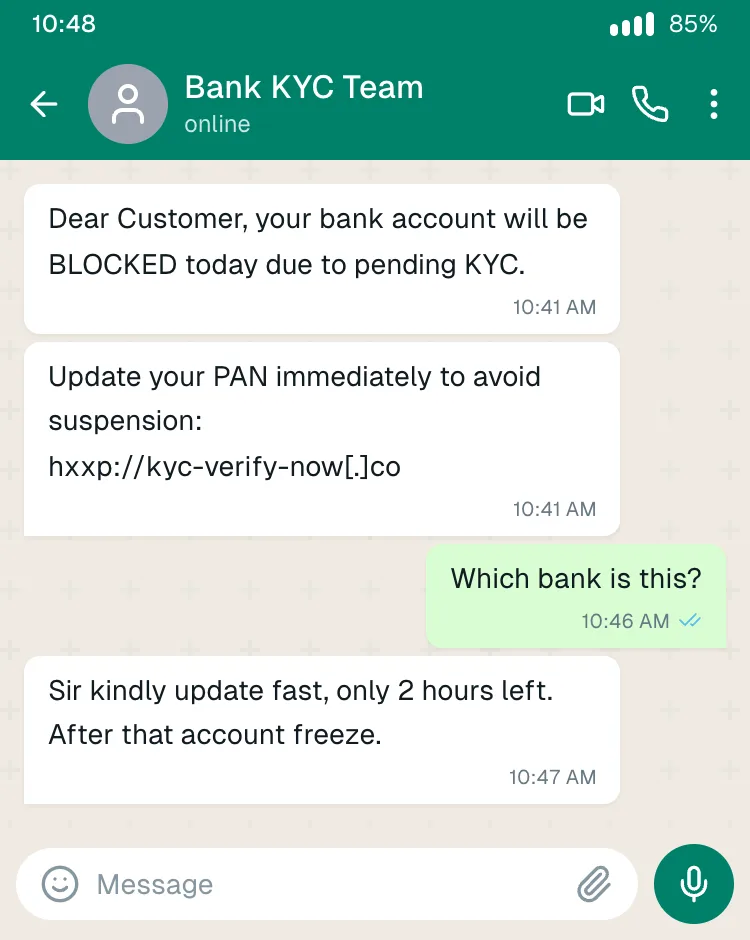
How it works: a message claiming to be from your bank says your account will be frozen today unless you update KYC or PAN through a link. The link leads to a fake bank page that collects your login and OTP, or tells you to install a "support" app that gives the scammer control of your phone.
Red flags: a deadline measured in hours, a link that isn't your bank's official domain, grammar that's slightly off, and a sender who can't tell you which bank they are. Banks don't ask you to update KYC through WhatsApp links.
2. Part-time "task" jobs: like videos, earn ₹3,000/day
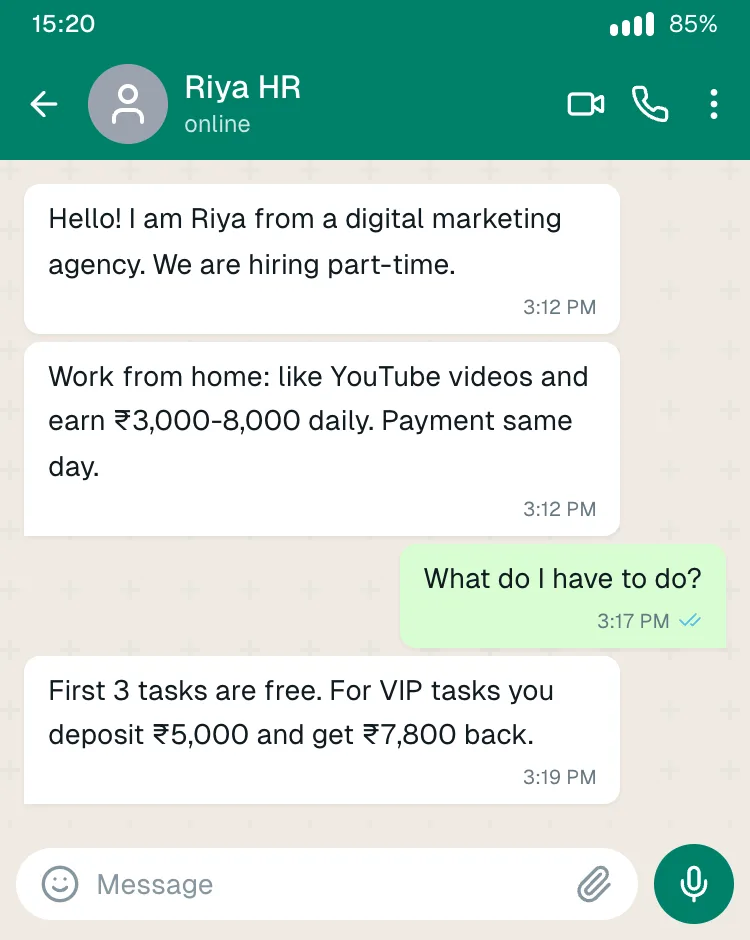
How it works: an unknown "HR" contact offers easy money for liking YouTube videos or rating hotels. The first tasks really do pay small amounts. Then you're moved to a Telegram group and asked to "invest" in prepaid or VIP tasks with bigger returns. The balance grows on screen, but you can never withdraw it without paying more "fees" or "taxes".
Red flags: a job you never applied for, pay far above normal for trivial work, and any request to deposit money to earn money.
3. "Hi Papa/Mummy, this is my new number"
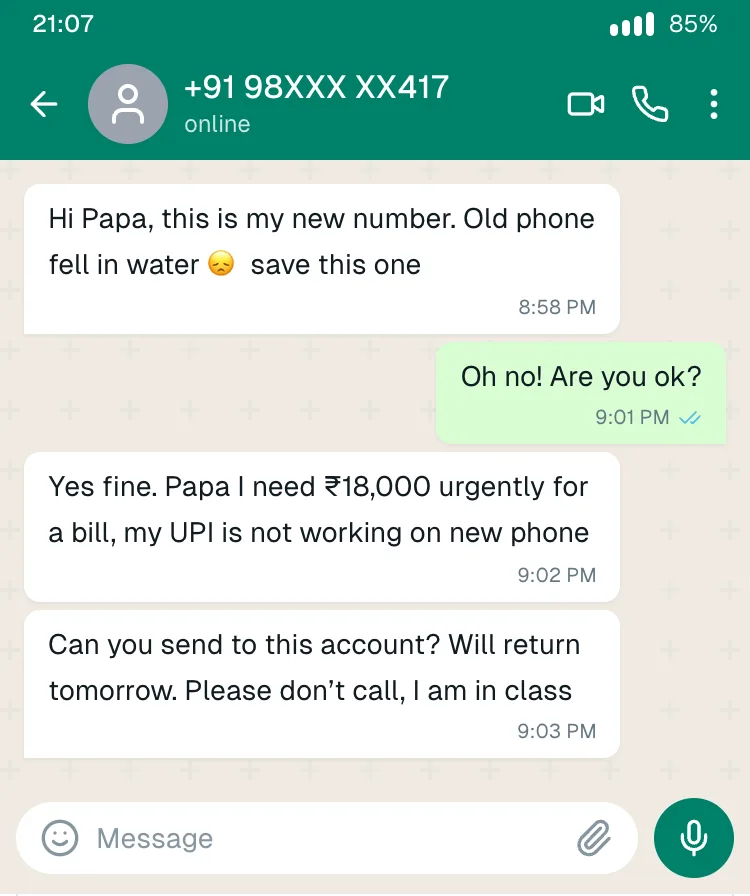
How it works: a message from an unknown number claims to be your child or relative on a new phone. Soon there's an urgent payment, "UPI isn't working on the new phone", and "please don't call, I'm in class".
Red flags: a new number plus an immediate money request, and discouraging a phone call. Always call the old number, or ask a question only the real person would know.
4. "Your electricity will be disconnected tonight"
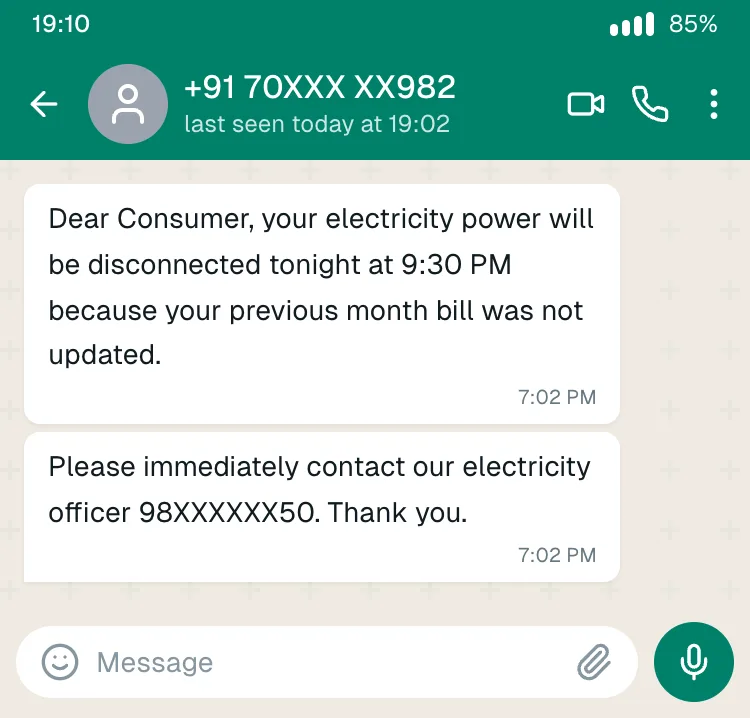
How it works: a message warns that power will be cut at 9:30 PM because last month's bill "was not updated", and gives an "electricity officer's" number. The officer asks you to pay a small amount through a link, or to install a screen-sharing app so they can "help". That app is then used to empty your bank account.
Red flags: a personal mobile number instead of your electricity board's official channels, a same-night deadline, and requests to install apps. Check your bill in your electricity board's official app or website.
5. "I sent money to your UPI by mistake, please return it"
How it works: you get a fake "credited" SMS or screenshot, then a polite message asking you to send the money back. No money ever arrived. Sometimes it arrives with a UPI collect request that takes money when you approve it.
Red flags: check your actual bank balance, not the screenshot or SMS. And remember: you never enter your UPI PIN to receive money.
6. Your "boss" needs gift cards urgently
How it works: a WhatsApp from an unknown number with your manager's or CEO's photo: "Are you free? I'm in a meeting, need you to buy Amazon gift cards for a client. Will reimburse."
Red flags: a new number with a real photo (profile photos are easy to copy), secrecy, gift cards (hard to trace), and "I can't talk right now". Verify on the manager's known number or in person.
7. Stock tips groups promising guaranteed returns
How it works: you're added to a "VIP trading" WhatsApp group full of screenshots of huge profits (often fake, and easy to make). You're told to install a trading app that isn't a real SEBI-registered broker. Deposits show fake gains until you try to withdraw.
Red flags: "guaranteed" returns, an app not listed by a SEBI-registered broker, and pressure to invest before a "window" closes. Profit screenshots in these groups prove nothing (see how to spot fake screenshots).
8. Courier, customs or "digital arrest"
How it works: a message or call claims a parcel in your name contains drugs or fake passports. You're "transferred" to fake police or CBI officers, often on video calls with uniforms and fake documents, told you're under "digital arrest", and ordered to transfer money for "verification".
Red flags: there is no such thing as a "digital arrest" in Indian law. Police don't interrogate people on WhatsApp video calls or demand money transfers. Hang up and call 1930.
9. "Congratulations, you've won a lottery"
How it works: you've "won" a KBC-style lottery or lucky draw you never entered, and just need to pay a processing fee or GST to claim it.
Red flags: you can't win a contest you didn't enter, and real prizes don't need upfront fees.
10. "I sent you an OTP by mistake, please share it"
How it works: a contact (sometimes a friend's hacked account) says they sent an OTP to your number by mistake. That code is actually for taking over your WhatsApp account, or approving a payment.
Red flags: any request for an OTP, from anyone. Turn on WhatsApp two-step verification (Settings → Account) so a leaked SMS code alone can't take over your account.
How to Run a 20-Minute Awareness Session
- Show, don't tell. Put 3-4 of the screenshots above on screen and ask: "Would you reply? What would you do?"
- Mark the red flags together: urgency, money, links, OTPs, "don't call".
- Make one yourself. Build a scam-style chat live in the mockup generator in two minutes. It shows how little a screenshot proves.
- Agree the family or office rule: verify on a known number before paying anyone, no matter who they appear to be.
- Share the reporting steps below and save 1930 in everyone's phone.
How to Report a WhatsApp Scam in India
- Money already lost? Call 1930 (national cyber-crime helpline) immediately. The faster you report, the better the chance of freezing the money.
- File a complaint at cybercrime.gov.in.
- Report suspected fraud messages (even if you didn't lose money) through Chakshu on the government's Sanchar Saathi portal.
- In WhatsApp: open the chat, tap the name, and choose Report and Block.
- Tell your bank straight away if you shared card, UPI or login details.
A Note on Using Mockups for Training
We recreated these examples because realistic training material works, and real victims' screenshots are private. The same tools can be misused, which is exactly why people need to see examples. Use recreated screenshots only for awareness, label them as recreated, and never use real names or numbers.
Frequently Asked Questions
What is the most common WhatsApp scam in India? Part-time "task" job scams, KYC/bank update messages and fake family "new number" requests are among the most widely reported, alongside investment-tip groups and "digital arrest" calls.
Can you get scammed just by reading a WhatsApp message? Reading a message is generally safe. The danger comes from tapping links, installing apps, sharing OTPs or PINs, approving UPI requests, or sending money.
Should I reply to a scam message to waste their time? No. Replying confirms your number is active. Report and block instead.
What should I do if I already paid? Call 1930 and your bank immediately, then file at cybercrime.gov.in. Keep the chat, number, transaction ID and screenshots.
Can I use these screenshots in my training slides? Yes, they're recreated examples made for awareness training. Or make your own with your organisation's scenarios.