Edesy Resume
ATS: goodTimeline

Timeline Resume Template

Timeline gives dates their own column, so a reader can follow your career history at a glance down the left edge of the page. It is useful when steady progression, long tenure or a sequence of promotions is part of your story. It reads best when a person looks at it directly, such as a referral or an interview copy.

Free: all templates, unlimited PDF and Word downloads, no watermark.
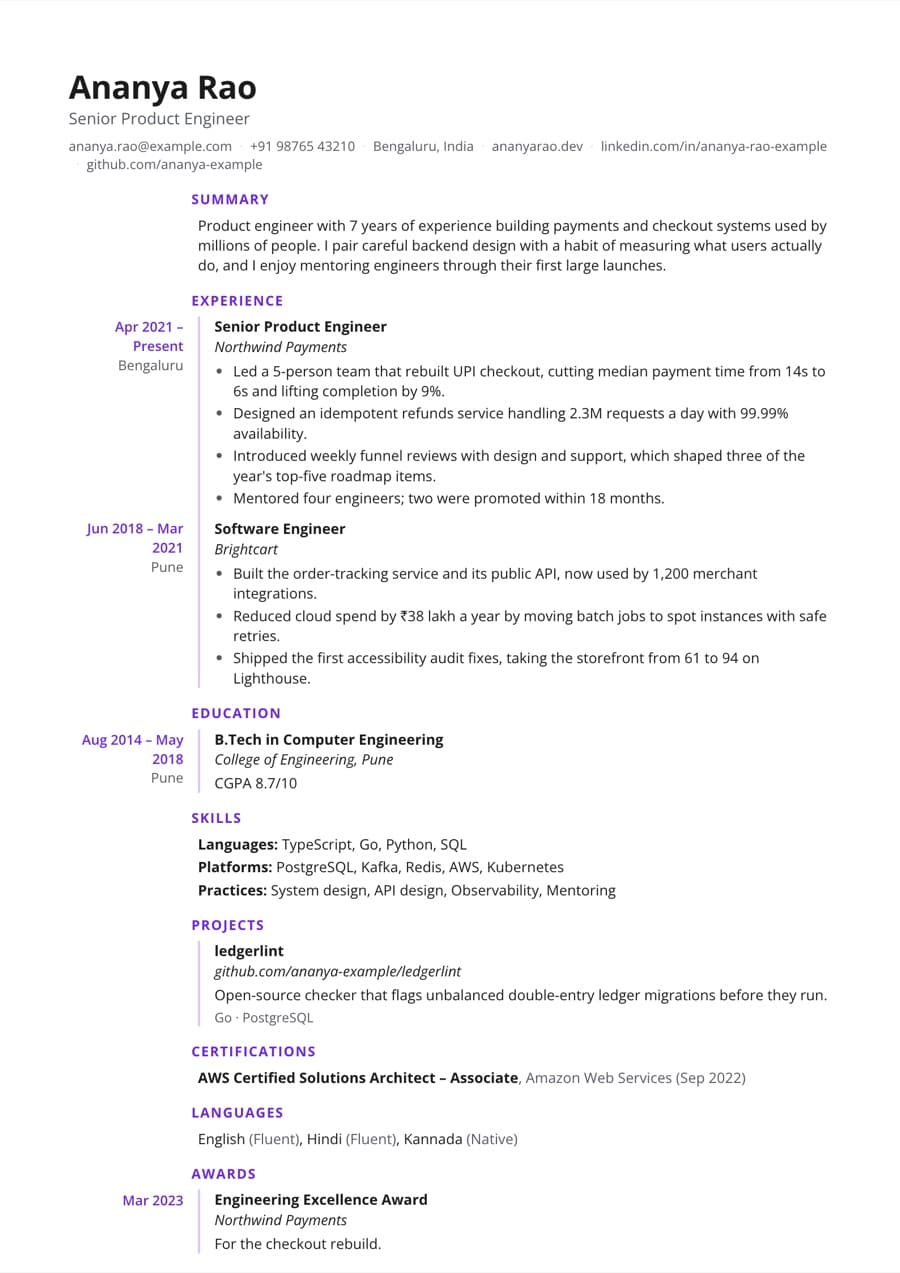
Timeline resume template filled with an example resume

Preview with a fictional example resume.
Design details

  • Dates sit in their own column beside each entry for an at-a-glance career history.
  • Open Sans at 9.5pt by default with a purple accent (#6d28d9).
  • Choose any of 10 fonts and 11 accent colors; font size, spacing and margins are adjustable.
  • Pick a date format of MMM YYYY, MM/YYYY or YYYY, and A4 or US Letter page size.

Best for

  • Professionals with a clear record of promotions
  • Long tenure at one or two employers
  • Interview copies where the panel walks through your history
  • Referrals and direct emails to hiring managers
  • Explaining a career break with clearly dated entries

Consider another template if

  • Harvard or Classic, when applying through job portals, since single-column layouts parse cleanly in every ATS.
  • Executive, if you are senior and want a single-column page with a larger serif name.
  • Sidebar, if your skills and certifications matter more than the dates.

Is the Timeline template ATS-friendly?

Timeline parses in applicant tracking systems, but the separate date column means some ATS can reorder content, for example detaching dates from roles. For job portal applications, a single-column template such as Harvard or Classic is the safer choice.

Tips for filling in the Timeline template

  1. Put a date on every role and check that end dates come after start dates; the resume score checks both.
  2. Use one consistent date format. MMM YYYY is usually the easiest to read in a narrow date column.
  3. For promotions at the same employer, list each role separately so the date column shows the progression.
  4. Keep a single-column duplicate for portal applications; switching templates keeps all your content.

Who the Timeline template suits

Similar templates

Timeline resume template FAQ

Build your resume with the Timeline template

Import your old resume or start from an example, check your score, then download a PDF or Word file for free.