Overview
- Send: Trigger a send (email, sms, push notification, webhook) a user.
- Balancer: Randomly split users across paths and rate limit traffic.
- Delay: Wait for a duration or until a specific date or time before proceeding.
- Entrance: Entry point into the
Journeythat can be triggered by events, schedules, or by otherJourneyswithLinksteps. - Event: Trigger an analytic event for the user.
- Experiment: Randomly send users down multiple paths for A/B testing purposes.
- Gate: Split a user between paths depending on the result of a condition.
- Link: Add users to other journeys, or restart the current journey.
- Update: Modify the current user's profile data.
Send
Sends are the main action you can perform inside of a journey. A send encapsulates a campaign under the hood giving you all of the same configuration you can get from a campaign. When a user reaches a send step the campaign is queued to be sent to the user.
Parameters
- Name: What you would like to call the step
- Data Key: A unique key you can set to reference the result of the action (more on that here)
- Campaign: The associated campaign. You can use an existing one or hit the plus icon to create a new one.
Balancer
A balancer step will randomly split users across various paths. You can configure an optional rate limit to limit the number of users that go down a path over a given time period. This type of step is useful for when you only want a given path to be accessed a certain amount of times over a time period. For example, a rate limit of 5 over a minute period would let each path be accessed 5 times every minute.
Parameters
- Name: What you would like to call the step
- Period: At what period should the rate limit be evaluated (i.e. day would reset how many executions can happen every day)
- Rate Limit: How many times the path can be evaluated during the set period of time.
Delay
Steps in a journey evaluate instantly, if you want to delay execution between two steps you can add a delay. There are three different kinds of available delays: For a Duration, Until Time and Until Date.
For a Duration
The simplest kind of delay, this just pauses execution of the users journey by a fixed number of days, hours and minutes.
Parameters
- Days: The number of days to delay for
- Hours: The number of hours to delay for
- Minutes: The number of minutes to delay for
Until Time
Pauses execution of the users journey until a certain time in the users timezone. If the time has already passed in the current day, execution wont happen until the next day.
Parameters
- Time: The time at which to run (evaluated in the users timezone)
Until Date
Pauses execution of the users journey until a provided date in the users timezone.
Parameters
- Date: The date at which to run (evaluated in the users timezone)
Entrance
Users start their journey with an entrance step. There are three different ways that an entrance can be triggered: none, event and schedule.
None
In this mode a journey doesn't automatically ever start, but can be triggered by a (Link)[#link] from another step. There are no parameters to configure.
Event
A user begins the journey when a specific event is triggered.
Parameters
- Event Name: Which event should trigger the entrance
- Condition: Conditions to filter down the event
- Multiple Entries: Events can trigger many times for a user, should a user be allowed to run through a journey more than once.
- Simultaneous Entries: If a user is allowed to pass through a journey more than once, should users be able to re-enter a journey before their current passthrough has completed.
Schedule
All users from a provided list will start the journey on a provided interval. This is useful for actions that should run daily for example.
Parameters
- Frequency: If the schedule should run daily or monthly
- Start Date: The first date that the schedule should run on (allows for scheduling into the future)
- End Date: An optional value if a journey should stop executing after a certain date
- Interval: Given the frequency, how often should the entrance happen. A frequency of daily with an interval of two would run every other day.
- Days: If set, on what days should the entrance only run on.
Event
If you have an external analytics provider setup (i.e. Segment) you can trigger external events using this type of step. When triggered, an event will be generated with parameters generated from the template and sent.
Parameters
- Name: What you would like to call the step
- Event Name: The name of the event that will be triggered
- Event Body: A JSON object representing the values to be sent alongside the event. This is a Handlebars field so you can pull in user values or other values from the journey.
Experiment
If you are trying to determine which of various options might perform the best, you can use an experiment step. Once the step is added to the journey, you can connect an unlimited number of steps as variants to be randomly split between. Each step can have a custom weight associated to it which will determine what percentage of the split that step gets.
Parameters
- Name: What you would like to call the step
- Ratio: Each attached step to the experiment has a ratio field that can be set to determine what percentage of users should go to that step. To determine the percentage the step will get, the experiment takes the ratio value of each step and devides it by the total number of steps.
Gate
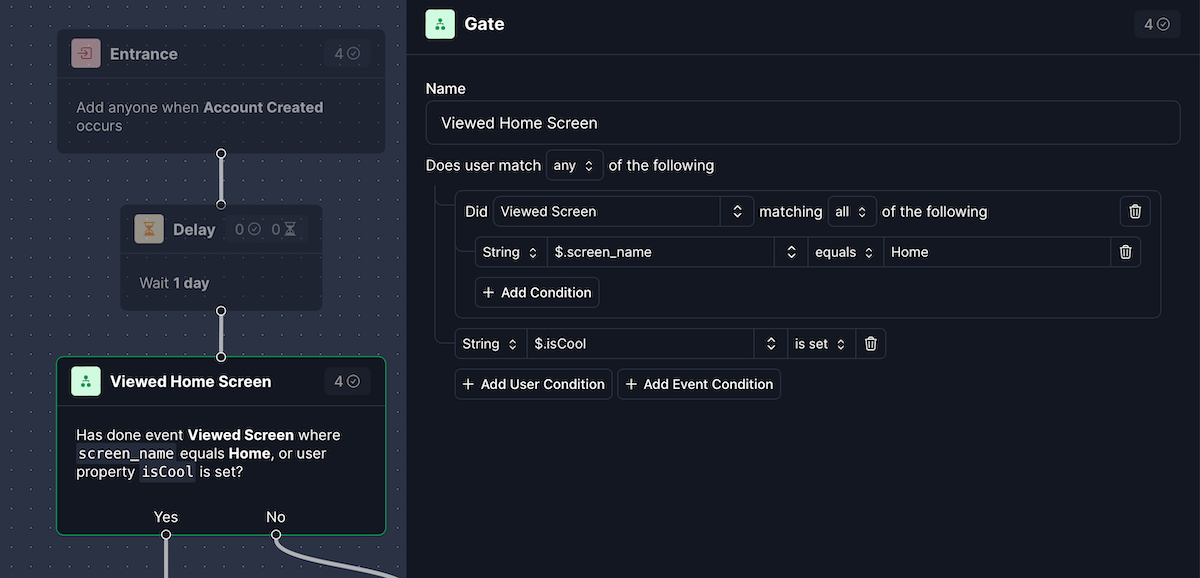
To split a user between paths depending on the result of a condition you can use a gate. Under the hood a gate uses the same rule builder as lists allowing you to build complex selectors targeting what a user has done (events) and properties on the user themselves. If a user matches the criteria, they are passed along to the Yes path, otherwise they are passed to the No path.
Parameters
- Name: What you would like to call the step
- Rule: A set of parameters to evaluate which path the user should go down. Matching users are sent down the
Yespath.
Link
Links allow you to bring a user to the start of a selected journey. This can be useful either to restart a journey (causing a loop) or to break journeys up into reusable pieces across other journeys.
Parameters
- Name: What you would like to call the step
- Target Journey: What journey a user will be sent to
- Delay: How long to wait before the link is executed. Links have forced delays since its very easy to cause infinite loops when transfering users between journeys.
Update
An update step allows you to make changes to the properties on a user. This can be useful if you are wanting to mark that a user went down a given path or you want to set values on the user from the result of another step.
Parameters
- Name: What you would like to call the step
- Body: A JSON object representing the values to be shallow merged onto the existing users properties. This is a Handlebars field so you can pull in user values or other values from the journey.