Eedesy
Book Demo
HomeProductsContact
Zapbot
  • Introduction
  • Overview
  • Graph Editor
  • Variables
  • Publish
  • Share
  • Context Menu
  • Export & Import
  • Overview
  • Text Bubble
  • Image Bubble
  • Video Bubble
  • Audio Bubble
  • Embed Bubble
  • Text Input
  • Number Input
  • Email Input
  • Phone Input
  • Date Input
  • Buttons
  • Picture Choice
  • Rating
  • File Upload
  • Payment
  • Set Variable
  • Condition
  • Redirect
  • Script
  • Zapbot Link
  • Wait
  • Jump
  • A/B Test
  • Webhook
  • Google Sheets
  • HTTP Request
  • OpenAI
  • Anthropic Claude
  • ElevenLabs
  • Google Analytics
  • Meta Pixel
  • Zapier
  • Make.com
  • Chatwoot
  • Zendesk
  • Send Email
  • Overview
  • HTML & JavaScript
  • React
  • Next.js
  • WordPress
  • Webflow
  • iFrame
  • Custom Domain
  • WhatsApp
  • Theme Overview
  • Custom Fonts
  • Bot Settings
  • Remember User
  • Overview
  • Analytics
  • How to Get Help
  • Creating Loops
  • UTM Tracking
  • Multiple Avatars
  • RTL Support
  • FAQ

Related Products

  • AI Voice Agent
  • AI Voice Assistant
  • Try Free
Zapbot
  • Introduction
  • Overview
  • Graph Editor
  • Variables
  • Publish
  • Share
  • Context Menu
  • Export & Import
  • Overview
  • Text Bubble
  • Image Bubble
  • Video Bubble
  • Audio Bubble
  • Embed Bubble
  • Text Input
  • Number Input
  • Email Input
  • Phone Input
  • Date Input
  • Buttons
  • Picture Choice
  • Rating
  • File Upload
  • Payment
  • Set Variable
  • Condition
  • Redirect
  • Script
  • Zapbot Link
  • Wait
  • Jump
  • A/B Test
  • Webhook
  • Google Sheets
  • HTTP Request
  • OpenAI
  • Anthropic Claude
  • ElevenLabs
  • Google Analytics
  • Meta Pixel
  • Zapier
  • Make.com
  • Chatwoot
  • Zendesk
  • Send Email
  • Overview
  • HTML & JavaScript
  • React
  • Next.js
  • WordPress
  • Webflow
  • iFrame
  • Custom Domain
  • WhatsApp
  • Theme Overview
  • Custom Fonts
  • Bot Settings
  • Remember User
  • Overview
  • Analytics
  • How to Get Help
  • Creating Loops
  • UTM Tracking
  • Multiple Avatars
  • RTL Support
  • FAQ
  1. Docs
  2. Zapbot
  3. Editor
  4. Variables

Variables

Learn how to use variables in Zapbot to create customized experiences for your users.

Variables are placeholders for content that you can then use anywhere in the Zapbot. It's a very important concept to understand to truly create a customized experience for the user.

Save an answer in a variable

You can tell your input block to save the answer into a variable and reuse then in a further bubble for example:
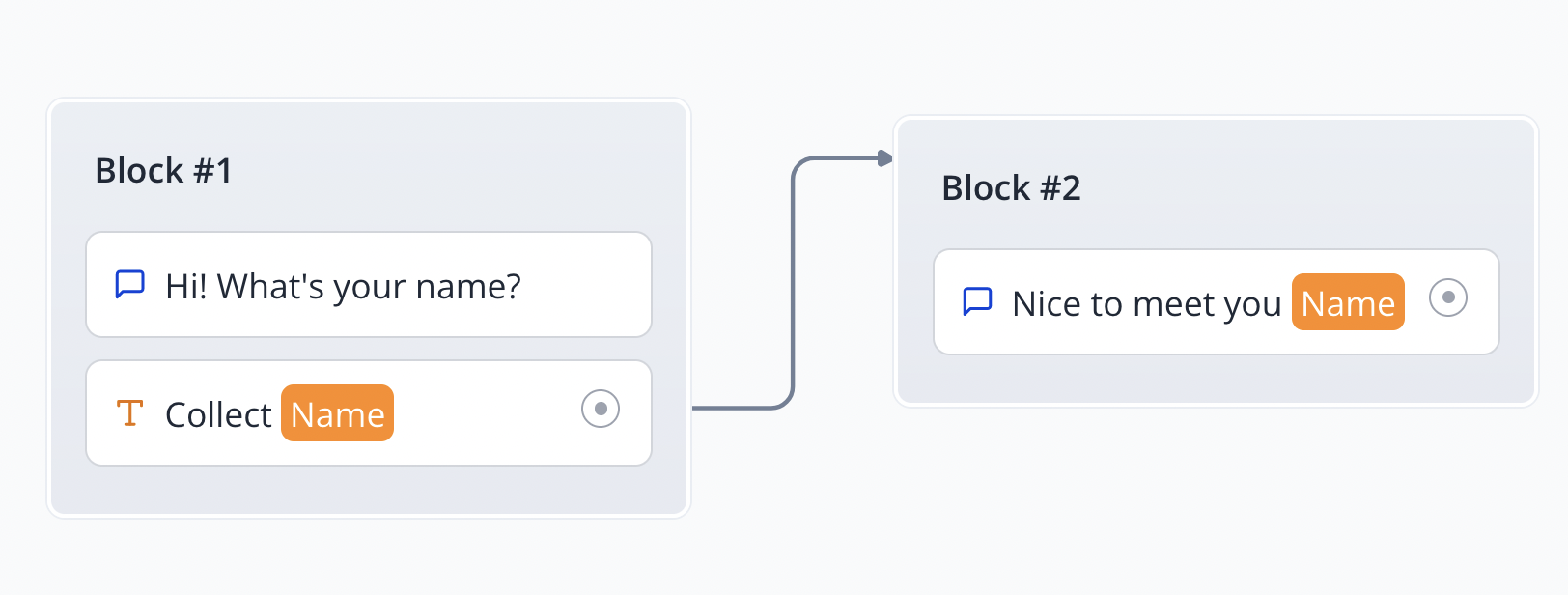
Variable saving

Use variables

Once your variables are declared you can use theme anywhere in your bot. For example you can display it in a text bubble with the following syntax:

{{My variable}} where "My variable" is the name of your variable.

Inline variable formatting

You can also decide to format your variable directly in the text bubble. For example if you want to display the variable "First name" in uppercase you can use the following syntax:

{{={{My variable}}.toUpperCase()=}}

When you insert {{= ... =}}, it means what's inside will be evaluated as JavaScript. So you can use any JavaScript inline function inside. The behavior is similar to the custom value in the Set variable block.

If you would like to get the first item of a list:

{{={{My variable}}[0]=}} or {{={{My variable}}.at(0)=}}

Likewise for last item:

{{={{My variable}}.at(-1)=}}

Variables panel

You can access the variables panel by clicking on the "Variables" button in the top right corner of the editor:
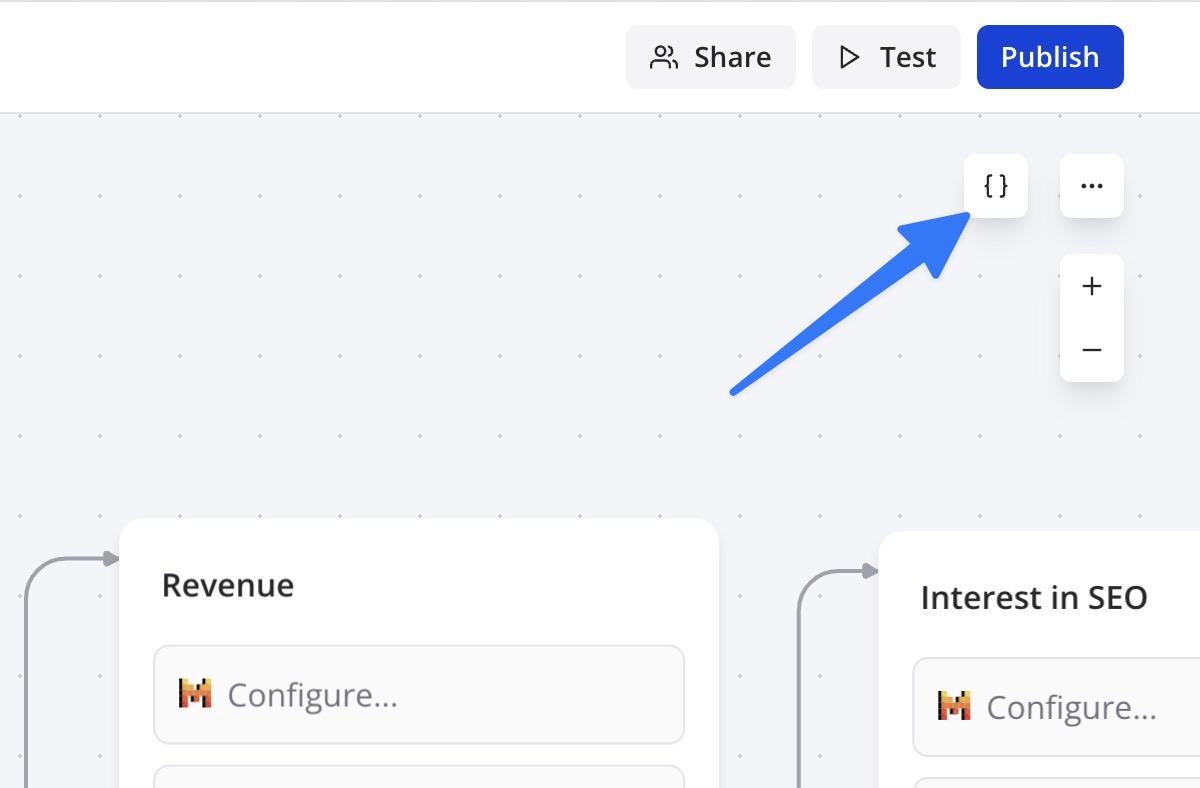
Variables panel

In this panel you can see all the variables declared in your bot. There, you can easily rename, edit, delete your variables.

By default, a variable is not saved in the results table. You can change it by enabling the Save in results option in the Variables panel.

Advanced concepts

Video tutorial available in the Zapbot dashboard

Prefilled variables

By default, any declared variables in the bot can be prefilled by passing initial values in the URL.

Let's say my zapbot contains these variables:

  • "Email"
  • "First name"

They can be initialized in the URL as URL parameters. If I'm launching my bot using this URL:

https://app.edesy.in/zapbot/[email protected]&First%20name=John (Note that spaces in variable names should be replaced by %20)

Then the variables will be prefilled as following:

  • Email => [email protected]
  • First name => John

Prefilled variables in your bot can be used in the same way as any other variables. For example if the first bot question is "What is your email?", you can decide to add a Condition block just before the question to check if the email was already prefilled to avoid asking the user to submit it. Or if you prefer your user to double check their existing email, you can enable the prefill input option in the settings.

Prefilling variables using the embed library is even easier. You need to add an object named prefilledVariables that contains a dictionary of your values. For example:

Zapbot.initBubble({
  zapbot: `my-bot`,
  prefilledVariables: {
    Email: '[email protected]',
    'First name': 'John',
  },
})

(Note that if your variable name contains spaces, it needs to be surrounded by quotes.)

Hidden variables

Your zapbot's variables don't have to be displayed to the user. You could create variables that are only used internally by the bot and displayed in your results. This allows you to add some context to a session for example a User ID, a utm_source parameter (in the case of a marketing campaign), or anything else.

You just have to make sure that the variables exist in the variables dropdown:
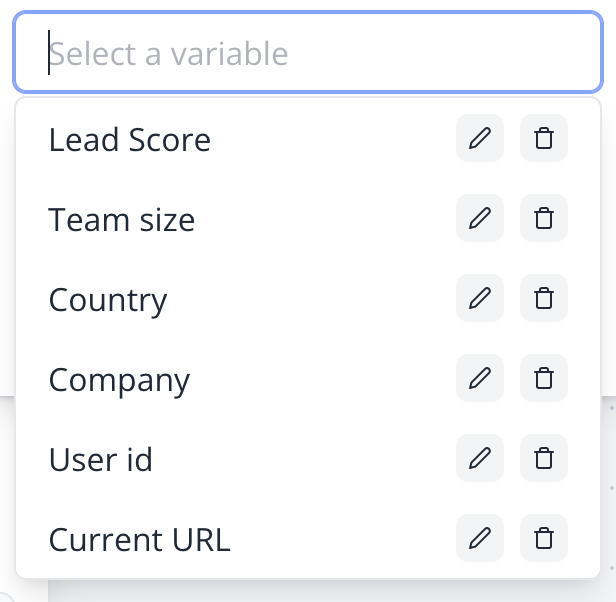
Variables dropdown

(This dropdown can be found in any place where you can add variables. It is global to your bot flow.)

Then the values will be available on the Results page in specific columns:
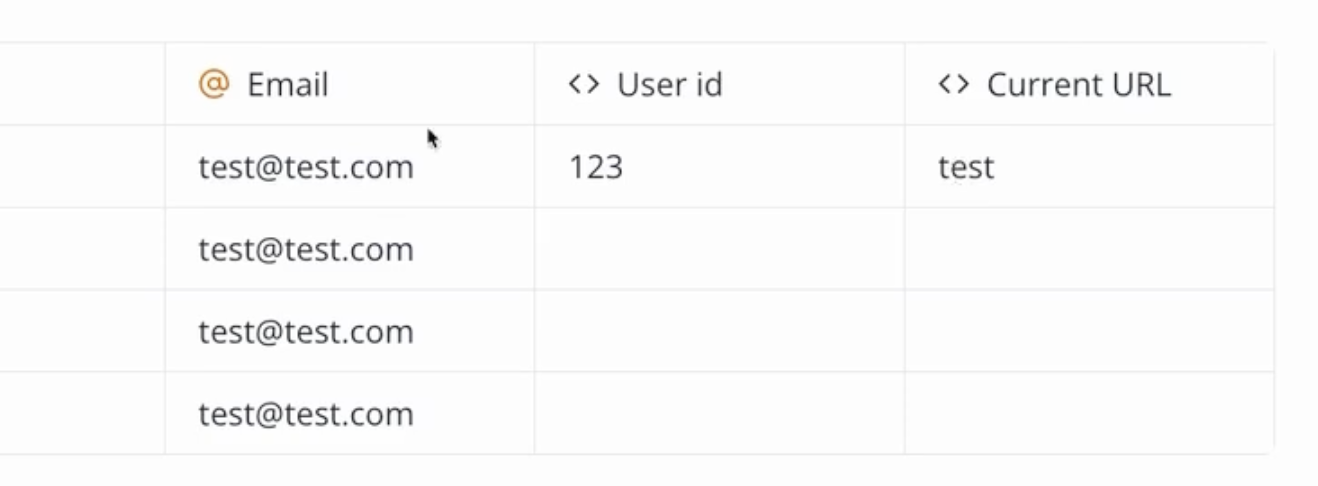
Variables in results

Valid value types

Variables content can either be a text (string) or a list of texts (string[]).

// Good
'Hello', ['item 1', 'item 2']

// Not good
2, true, { foo: 'bar' }
// Will automatically converted into
'2', 'true', '{ foo: "bar" }'

If you provide an object, number or boolean. It will always be converted into either a text or a list of texts before the variable is saved into the database.

This limitation is intended. Variables should have simple content. It forces you to have a cleaner bot structure and to use the variable content in a more meaningful way.

In some cases, the variable content will be dynamically parsed to match its intended type. For example, if you provide a text that looks like a number in a condition block, it will be converted into a number during the condition execution.

If you really need to save a complex content into a variable, for example an object, you can use the JSON.stringify function to convert it into a text. And whenever you are using the variable, you can dynamically parse it back into an object using JSON.parse in an inline format:

{{=JSON.parse({{My object variable}})=}}
Previous
Graph Editor
Next
Publish

On this page

  • Save an answer in a variable
  • Use variables
  • Inline variable formatting
  • Variables panel
  • Advanced concepts
  • Prefilled variables
  • Hidden variables
  • Valid value types

Stay Updated

Get the latest updates on AI voice technology, product releases, and exclusive resources.

Get Started

Try our products for free
AI Voice Agent
Build voice AI for calls
WhatsApp AI Bot
Automate WhatsApp chats
Website Chatbot
AI chat for websites
Edesy CRM
Manage leads & customers
Book a DemoCall UsEmail Us
Eedesy

Your all-in-one platform for digital innovation. We build AI-powered solutions that transform how businesses operate.

[email protected]+91 95475 31359

Products

  • AI Voice Assistant
  • WhatsApp Voice AI
  • WhatsApp Bot Builder
  • AI Website Chatbot
  • AI-SDR
  • Number Masking
  • Shopify Apps
  • View All Products

Solutions

  • For E-commerce
  • For Healthcare
  • For Real Estate
  • For Restaurants
  • For Appointments
  • View All Use Cases

Services

  • AI Chatbot Development
  • Voice AI Development
  • Shopify Development
  • SaaS Development
  • WhatsApp API Integration
  • View All Services

Resources

  • Documentation
  • Voice Agent Docs
  • API Reference
  • Number Masking API Docs
  • Blog
  • Changelog
  • Book a Demo

Company

  • About Us
  • Contact
  • Careers
  • Privacy Policy
  • Terms of Service

Products

  • AI Voice Assistant
  • WhatsApp Voice AI
  • WhatsApp Bot Builder
  • AI Website Chatbot
  • AI-SDR
  • Number Masking
  • Shopify Apps
  • View All Products

Solutions

  • For E-commerce
  • For Healthcare
  • For Real Estate
  • For Restaurants
  • For Appointments
  • View All Use Cases

Services

  • AI Chatbot Development
  • Voice AI Development
  • Shopify Development
  • SaaS Development
  • WhatsApp API Integration
  • View All Services

Resources

  • Documentation
  • Voice Agent Docs
  • API Reference
  • Number Masking API Docs
  • Blog
  • Changelog
  • Book a Demo

Company

  • About Us
  • Contact
  • Careers
  • Privacy Policy
  • Terms of Service
  • AI Voice Assistant
  • WhatsApp Voice AI
  • WhatsApp Bot Builder
  • AI Website Chatbot
  • AI-SDR
  • Number Masking
  • Shopify Apps
  • View All Products
  • For E-commerce
  • For Healthcare
  • For Real Estate
  • For Restaurants
  • For Appointments
  • View All Use Cases
  • AI Chatbot Development
  • Voice AI Development
  • Shopify Development
  • SaaS Development
  • WhatsApp API Integration
  • View All Services
  • Documentation
  • Voice Agent Docs
  • API Reference
  • Number Masking API Docs
  • Blog
  • Changelog
  • Book a Demo
  • About Us
  • Contact
  • Careers
  • Privacy Policy
  • Terms of Service

Popular Free Tools

Compress PDFMerge PDFPDF to WordGST CalculatorEMI CalculatorSIP CalculatorJSON FormatterBase64 EncoderImage CompressorQR Code GeneratorVoice AI ROI CalculatorAmazon FBA CalculatorAI Email WriterVideo to GIFPrivacy Policy GeneratorCRM ROI CalculatorMeeting Cost Calculator
Categories:PDF ToolsDeveloper ToolsFinance CalculatorsImage ToolsVideo ToolsAI Writing ToolsAudio ToolsWhatsApp ToolsDocument GeneratorsVoice AI ToolsE-commerce ToolsView All Tools

© 2026 Edesy Technology Labs Pvt Ltd

SSL Secured
99.9% Uptime