Eedesy
Book Demo
HomeProductsContact
Zapbot
  • Introduction
  • Overview
  • Graph Editor
  • Variables
  • Publish
  • Share
  • Context Menu
  • Export & Import
  • Overview
  • Text Bubble
  • Image Bubble
  • Video Bubble
  • Audio Bubble
  • Embed Bubble
  • Text Input
  • Number Input
  • Email Input
  • Phone Input
  • Date Input
  • Buttons
  • Picture Choice
  • Rating
  • File Upload
  • Payment
  • Set Variable
  • Condition
  • Redirect
  • Script
  • Zapbot Link
  • Wait
  • Jump
  • A/B Test
  • Webhook
  • Google Sheets
  • HTTP Request
  • OpenAI
  • Anthropic Claude
  • ElevenLabs
  • Google Analytics
  • Meta Pixel
  • Zapier
  • Make.com
  • Chatwoot
  • Zendesk
  • Send Email
  • Overview
  • HTML & JavaScript
  • React
  • Next.js
  • WordPress
  • Webflow
  • iFrame
  • Custom Domain
  • WhatsApp
  • Theme Overview
  • Custom Fonts
  • Bot Settings
  • Remember User
  • Overview
  • Analytics
  • How to Get Help
  • Creating Loops
  • UTM Tracking
  • Multiple Avatars
  • RTL Support
  • FAQ

Related Products

  • AI Voice Agent
  • AI Voice Assistant
  • Try Free
Zapbot
  • Introduction
  • Overview
  • Graph Editor
  • Variables
  • Publish
  • Share
  • Context Menu
  • Export & Import
  • Overview
  • Text Bubble
  • Image Bubble
  • Video Bubble
  • Audio Bubble
  • Embed Bubble
  • Text Input
  • Number Input
  • Email Input
  • Phone Input
  • Date Input
  • Buttons
  • Picture Choice
  • Rating
  • File Upload
  • Payment
  • Set Variable
  • Condition
  • Redirect
  • Script
  • Zapbot Link
  • Wait
  • Jump
  • A/B Test
  • Webhook
  • Google Sheets
  • HTTP Request
  • OpenAI
  • Anthropic Claude
  • ElevenLabs
  • Google Analytics
  • Meta Pixel
  • Zapier
  • Make.com
  • Chatwoot
  • Zendesk
  • Send Email
  • Overview
  • HTML & JavaScript
  • React
  • Next.js
  • WordPress
  • Webflow
  • iFrame
  • Custom Domain
  • WhatsApp
  • Theme Overview
  • Custom Fonts
  • Bot Settings
  • Remember User
  • Overview
  • Analytics
  • How to Get Help
  • Creating Loops
  • UTM Tracking
  • Multiple Avatars
  • RTL Support
  • FAQ
  1. Docs
  2. Zapbot
  3. Theme & Settings
  4. Bot Settings

Settings

Configure general settings, typing emulation, security, and metadata for your Zapbot.

General

The general settings represent the general behaviors of your zapbot.
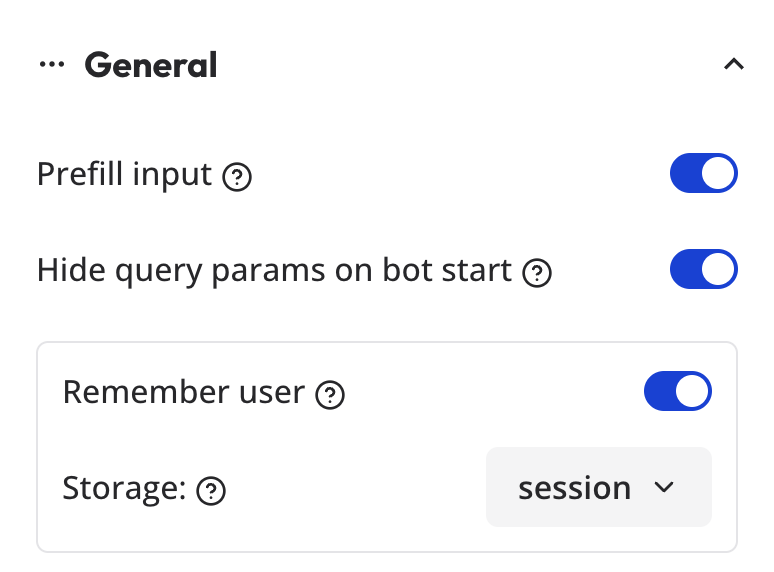
General settings

  • Prefill input: If enabled, the inputs will be automatically pre-filled whenever their associated variable has a value.
  • Hide query params on bot start: If enabled, the query params will be hidden when the bot starts.
  • Remember user
  • System messages: You can overwrite any system message of your bot, it includes the default invalid message bot response, the network error message, the bot is closed, etc.

Typing emulation

By default, your zapbot will emulate a certain typing speed. It is considered a good default as slow as a human typing speed and it's not too fast so that multiple bubbles can be read sequentially.

You can customize this typing speed in the settings:
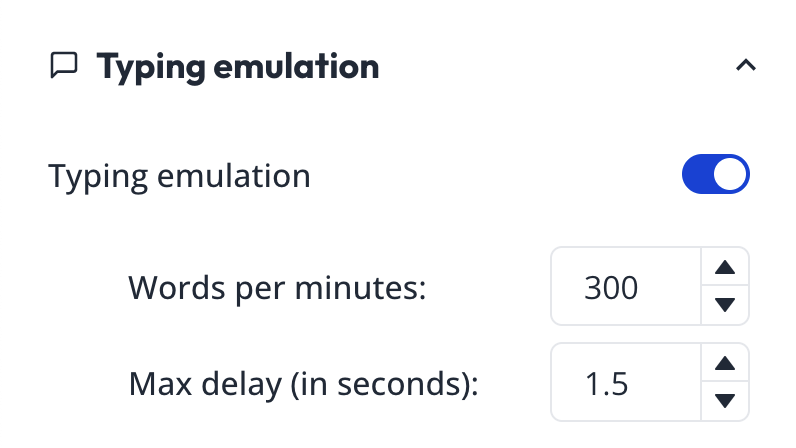
Typing emulation

The goal of a zapbot is not to pretend that the bot is a real human. So we suggest not setting the typing speed too low.

The Disable on first message allows you to disable the typing emulation on the first message. This is useful if you want to lower the first message display time since the site can take some time to load first.

The Delay between messages by default is 0 and you can increase it up to 5 seconds if you want to add a delay between every messages sent by the zapbot. If you ever want to pause the bot just once. You can insert a Wait block between both messages.

Security

By default, your zapbot can be executed from any origin but you can restrict the execution of your zapbot to specific origins. This is useful if you want to embed your zapbot in your website and prevent it from being executed on other websites by malicious actors.

For example, if you want to allow your zapbot to be executed only on https://my-company.com, you can add https://my-company.com to the list of allowed origins.

Warning: If you add a URL to the list but omit https://app.edesy.in/zapbot, then your zapbot shareable URL will not work anymore.

Metadata

In the Metadata section, you can customize how the preview card will look if you share your bot URL on social media for example.

You can also add some custom head code to add third-party scripts.

Google Tag Manager

Allows you to easily add a GTM container to your bot. To find your GTM container ID, go to your GTM dashboard and click on the container you want to use. The ID is displayed in the top right corner.

Note that you should not include it if you are embedding your zapbot in an existing website. GTM should be installed in the parent website instead.

Previous
Custom Fonts
Next
Remember User

On this page

  • General
  • Typing emulation
  • Security
  • Metadata
  • Google Tag Manager

Stay Updated

Get the latest updates on AI voice technology, product releases, and exclusive resources.

Get Started

Try our products for free
AI Voice Agent
Build voice AI for calls
WhatsApp AI Bot
Automate WhatsApp chats
Website Chatbot
AI chat for websites
Edesy CRM
Manage leads & customers
Book a DemoCall UsEmail Us
Eedesy

Your all-in-one platform for digital innovation. We build AI-powered solutions that transform how businesses operate.

[email protected]+91 95475 31359

Products

  • AI Voice Assistant
  • WhatsApp Voice AI
  • WhatsApp Bot Builder
  • AI Website Chatbot
  • AI-SDR
  • Number Masking
  • Shopify Apps
  • View All Products

Solutions

  • For E-commerce
  • For Healthcare
  • For Real Estate
  • For Restaurants
  • For Appointments
  • View All Use Cases

Services

  • AI Chatbot Development
  • Voice AI Development
  • Shopify Development
  • SaaS Development
  • WhatsApp API Integration
  • View All Services

Resources

  • Documentation
  • Voice Agent Docs
  • API Reference
  • Number Masking API Docs
  • Blog
  • Changelog
  • Book a Demo

Company

  • About Us
  • Contact
  • Careers
  • Privacy Policy
  • Terms of Service

Products

  • AI Voice Assistant
  • WhatsApp Voice AI
  • WhatsApp Bot Builder
  • AI Website Chatbot
  • AI-SDR
  • Number Masking
  • Shopify Apps
  • View All Products

Solutions

  • For E-commerce
  • For Healthcare
  • For Real Estate
  • For Restaurants
  • For Appointments
  • View All Use Cases

Services

  • AI Chatbot Development
  • Voice AI Development
  • Shopify Development
  • SaaS Development
  • WhatsApp API Integration
  • View All Services

Resources

  • Documentation
  • Voice Agent Docs
  • API Reference
  • Number Masking API Docs
  • Blog
  • Changelog
  • Book a Demo

Company

  • About Us
  • Contact
  • Careers
  • Privacy Policy
  • Terms of Service
  • AI Voice Assistant
  • WhatsApp Voice AI
  • WhatsApp Bot Builder
  • AI Website Chatbot
  • AI-SDR
  • Number Masking
  • Shopify Apps
  • View All Products
  • For E-commerce
  • For Healthcare
  • For Real Estate
  • For Restaurants
  • For Appointments
  • View All Use Cases
  • AI Chatbot Development
  • Voice AI Development
  • Shopify Development
  • SaaS Development
  • WhatsApp API Integration
  • View All Services
  • Documentation
  • Voice Agent Docs
  • API Reference
  • Number Masking API Docs
  • Blog
  • Changelog
  • Book a Demo
  • About Us
  • Contact
  • Careers
  • Privacy Policy
  • Terms of Service

Popular Free Tools

Compress PDFMerge PDFPDF to WordGST CalculatorEMI CalculatorSIP CalculatorJSON FormatterBase64 EncoderImage CompressorQR Code GeneratorVoice AI ROI CalculatorAmazon FBA CalculatorAI Email WriterVideo to GIFPrivacy Policy GeneratorCRM ROI CalculatorMeeting Cost Calculator
Categories:PDF ToolsDeveloper ToolsFinance CalculatorsImage ToolsVideo ToolsAI Writing ToolsAudio ToolsWhatsApp ToolsDocument GeneratorsVoice AI ToolsE-commerce ToolsView All Tools

© 2026 Edesy Technology Labs Pvt Ltd

SSL Secured
99.9% Uptime