Eedesy
Book Demo
HomeProductsContact
Email Platform
  • Introduction
  • Quick Start
  • Overview
  • Create Campaign
  • Design
  • Launch
  • Templates
  • Overview
  • Journey Types
  • Journey Data
  • Welcome Flow
  • Weekly Summary
  • Reservations
  • Recurring Reminders
  • Lists
  • Users
  • Overview
  • Providers
  • API Keys
  • Subscriptions
  • Overview
  • SendGrid
  • Mailgun
  • Amazon SES
  • SMTP
  • Twilio
  • Plivo
  • Vonage
  • Segment
  • PostHog
  • Push Notifications
  • Android SDK
  • iOS SDK
  • Overview
  • AWS EC2
  • AWS Elastic Beanstalk
  • DigitalOcean
  • Authentication
  • Keycloak Integration
  • Keycloak vs Basic Auth
  • Storage
  • Configuration
  • Deep Linking
  • Admin API
  • Client API

Related Products

  • AI Voice Agent
  • AI Voice Assistant
  • Try Free
Email Platform
  • Introduction
  • Quick Start
  • Overview
  • Create Campaign
  • Design
  • Launch
  • Templates
  • Overview
  • Journey Types
  • Journey Data
  • Welcome Flow
  • Weekly Summary
  • Reservations
  • Recurring Reminders
  • Lists
  • Users
  • Overview
  • Providers
  • API Keys
  • Subscriptions
  • Overview
  • SendGrid
  • Mailgun
  • Amazon SES
  • SMTP
  • Twilio
  • Plivo
  • Vonage
  • Segment
  • PostHog
  • Push Notifications
  • Android SDK
  • iOS SDK
  • Overview
  • AWS EC2
  • AWS Elastic Beanstalk
  • DigitalOcean
  • Authentication
  • Keycloak Integration
  • Keycloak vs Basic Auth
  • Storage
  • Configuration
  • Deep Linking
  • Admin API
  • Client API
  1. Docs
  2. Email Platform
  3. Campaigns
  4. Launch

Launch

Learn how to launch and schedule your email campaigns in Edesy Email.

Launch a Campaign

Blast Campaign

Once your blast campaign is designed and ready, you can send it to your targetted list. To send a campaign, hit the Launch Campaign button on the top right hand side.
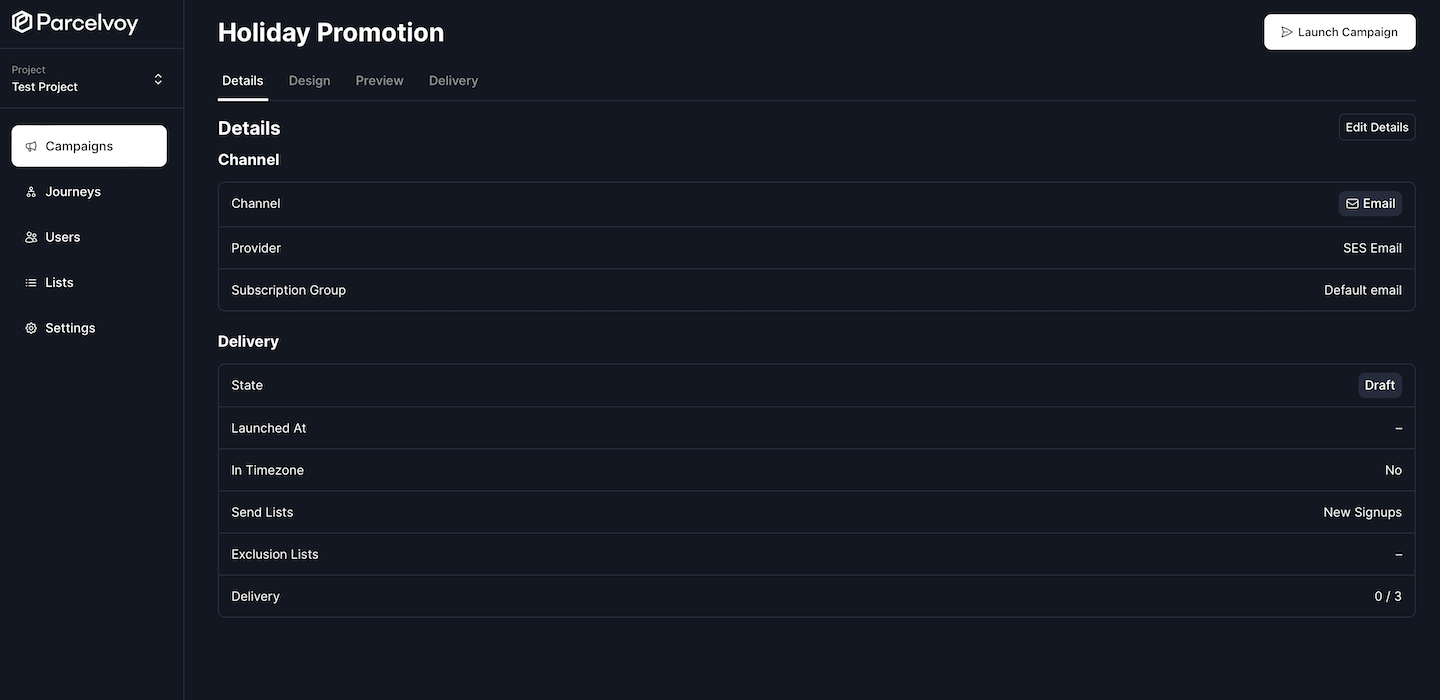
Launch Campaign

Scheduling

When you are ready to launch, you can chose if you want messages to go out immediately or be scheduled for some time in the future.

Now

This will immediately start enqueing emails to be sent out. Selecting this option is great for anything you are ready to send but it does not allow you to abort the campaign since everything goes out immediately.
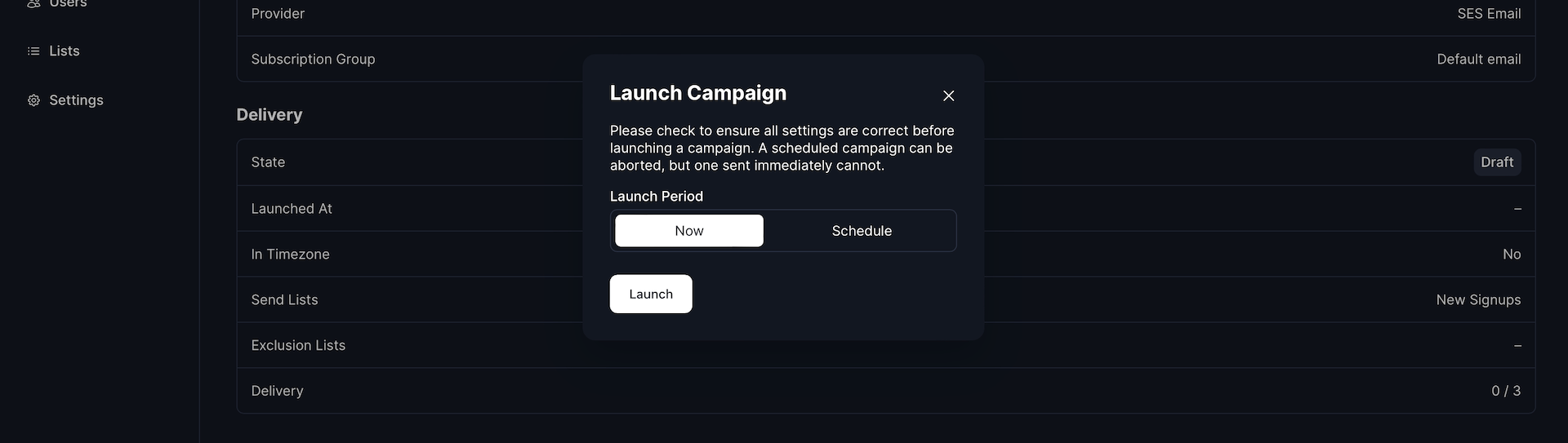
Launch Campaign Modal

Schedule

If you opt to schedule a campaign to go out in the future you can specify a time and date to begin the send. By default the date and time you select are in the projects selected timezone.
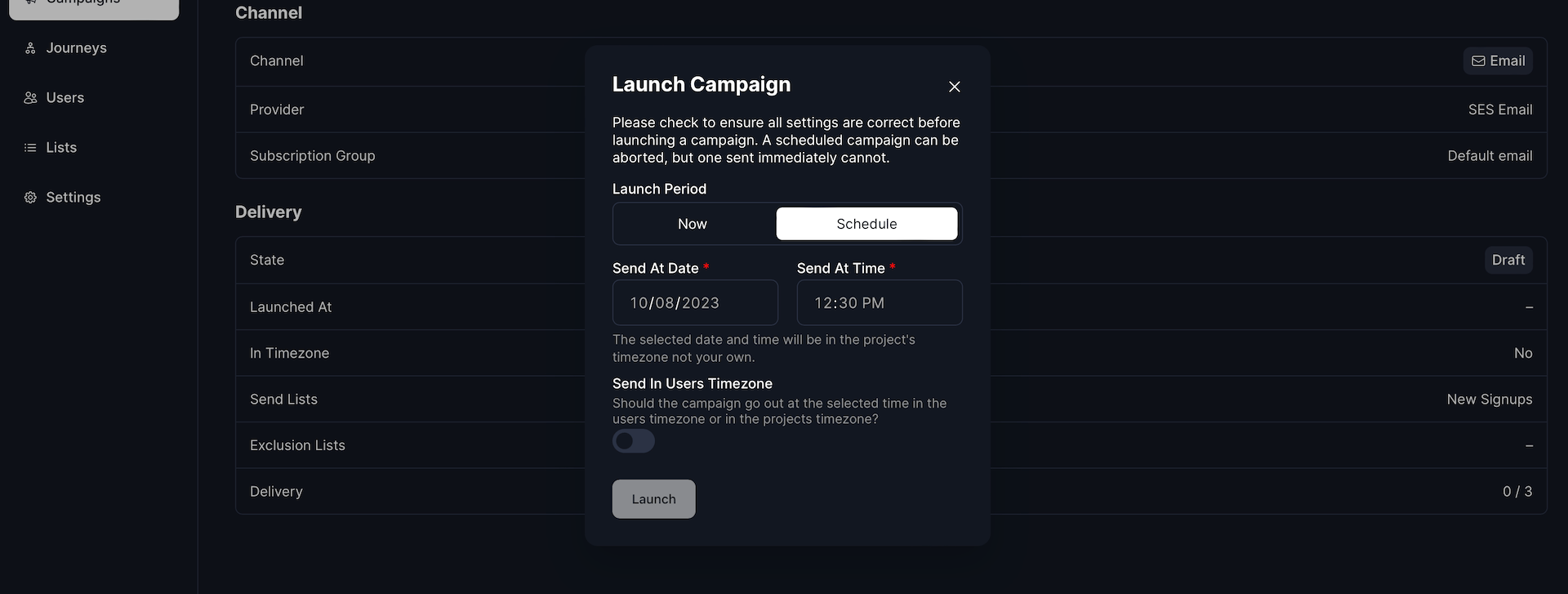
Launch Campaign Schedule

Send In Users Timezone

You can override sending a campaign in your projects default and better target your users by utilizing the Send In Users Timezone functionality. To enable this, just toggle that option. We highly recommend selecting this option if you have a global userbase.

If you have this toggle selected a message will go out at the selected time in the users timezone. For example if you opt for a message to go out at 7:00am, this means that a user in Madrids message would send at 5:00 UTC wereas a user in Chicagos message would send seven hours later.

Because of variations in timezones it is important to note that you should schedule any campaigns you wish to go out in the users timezone at least 24hrs in advance otherwise the selected time for that users timezone may have already passed. If a given time has already passed, the campaign will send immediately.

Aborting

You can abort a campaign at any time, however messages may have already been sent. Aborting a campaign happens immediately and cancels any pending sends.

Restarting

If you wish to resume a campaign that has been aborted it will not resend to any users who have already received a previous message. Only users who have not received the campaign will receive a restarted campaigns message.

Trigger Campaign

Trigger campaigns do not need to be launched and are ready to send via API as soon as you have completed setup.

You can find an example of how to send a trigger campaign on the campaigns overview screen or you can refer to our admin API documentation for further details.

  • Trigger Email Campaign Send
  • Trigger Text Message Campaign Send
  • Trigger Push Notification Campaign Send
Previous
Design
Next
Templates

On this page

  • Blast Campaign
  • Scheduling
  • Now
  • Schedule
  • Aborting
  • Restarting
  • Trigger Campaign

Stay Updated

Get the latest updates on AI voice technology, product releases, and exclusive resources.

Get Started

Try our products for free
AI Voice Agent
Build voice AI for calls
WhatsApp AI Bot
Automate WhatsApp chats
Website Chatbot
AI chat for websites
Edesy CRM
Manage leads & customers
Book a DemoCall UsEmail Us
Eedesy

Your all-in-one platform for digital innovation. We build AI-powered solutions that transform how businesses operate.

[email protected]+91 95475 31359

Products

  • AI Voice Assistant
  • WhatsApp Voice AI
  • WhatsApp Bot Builder
  • AI Website Chatbot
  • AI-SDR
  • Number Masking
  • Shopify Apps
  • View All Products

Solutions

  • For E-commerce
  • For Healthcare
  • For Real Estate
  • For Restaurants
  • For Appointments
  • View All Use Cases

Services

  • AI Chatbot Development
  • Voice AI Development
  • Shopify Development
  • SaaS Development
  • WhatsApp API Integration
  • View All Services

Resources

  • Documentation
  • Voice Agent Docs
  • API Reference
  • Number Masking API Docs
  • Blog
  • Changelog
  • Book a Demo

Company

  • About Us
  • Contact
  • Careers
  • Privacy Policy
  • Terms of Service

Products

  • AI Voice Assistant
  • WhatsApp Voice AI
  • WhatsApp Bot Builder
  • AI Website Chatbot
  • AI-SDR
  • Number Masking
  • Shopify Apps
  • View All Products

Solutions

  • For E-commerce
  • For Healthcare
  • For Real Estate
  • For Restaurants
  • For Appointments
  • View All Use Cases

Services

  • AI Chatbot Development
  • Voice AI Development
  • Shopify Development
  • SaaS Development
  • WhatsApp API Integration
  • View All Services

Resources

  • Documentation
  • Voice Agent Docs
  • API Reference
  • Number Masking API Docs
  • Blog
  • Changelog
  • Book a Demo

Company

  • About Us
  • Contact
  • Careers
  • Privacy Policy
  • Terms of Service
  • AI Voice Assistant
  • WhatsApp Voice AI
  • WhatsApp Bot Builder
  • AI Website Chatbot
  • AI-SDR
  • Number Masking
  • Shopify Apps
  • View All Products
  • For E-commerce
  • For Healthcare
  • For Real Estate
  • For Restaurants
  • For Appointments
  • View All Use Cases
  • AI Chatbot Development
  • Voice AI Development
  • Shopify Development
  • SaaS Development
  • WhatsApp API Integration
  • View All Services
  • Documentation
  • Voice Agent Docs
  • API Reference
  • Number Masking API Docs
  • Blog
  • Changelog
  • Book a Demo
  • About Us
  • Contact
  • Careers
  • Privacy Policy
  • Terms of Service

Popular Free Tools

Compress PDFMerge PDFPDF to WordGST CalculatorEMI CalculatorSIP CalculatorJSON FormatterBase64 EncoderImage CompressorQR Code GeneratorVoice AI ROI CalculatorAmazon FBA CalculatorAI Email WriterVideo to GIFPrivacy Policy GeneratorCRM ROI CalculatorMeeting Cost Calculator
Categories:PDF ToolsDeveloper ToolsFinance CalculatorsImage ToolsVideo ToolsAI Writing ToolsAudio ToolsWhatsApp ToolsDocument GeneratorsVoice AI ToolsE-commerce ToolsView All Tools

© 2026 Edesy Technology Labs Pvt Ltd

SSL Secured
99.9% Uptime