Eedesy
Book Demo
HomeProductsContact
Zapbot
  • Introduction
  • Overview
  • Graph Editor
  • Variables
  • Publish
  • Share
  • Context Menu
  • Export & Import
  • Overview
  • Text Bubble
  • Image Bubble
  • Video Bubble
  • Audio Bubble
  • Embed Bubble
  • Text Input
  • Number Input
  • Email Input
  • Phone Input
  • Date Input
  • Buttons
  • Picture Choice
  • Rating
  • File Upload
  • Payment
  • Set Variable
  • Condition
  • Redirect
  • Script
  • Zapbot Link
  • Wait
  • Jump
  • A/B Test
  • Webhook
  • Google Sheets
  • HTTP Request
  • OpenAI
  • Anthropic Claude
  • ElevenLabs
  • Google Analytics
  • Meta Pixel
  • Zapier
  • Make.com
  • Chatwoot
  • Zendesk
  • Send Email
  • Overview
  • HTML & JavaScript
  • React
  • Next.js
  • WordPress
  • Webflow
  • iFrame
  • Custom Domain
  • WhatsApp
  • Theme Overview
  • Custom Fonts
  • Bot Settings
  • Remember User
  • Overview
  • Analytics
  • How to Get Help
  • Creating Loops
  • UTM Tracking
  • Multiple Avatars
  • RTL Support
  • FAQ

Related Products

  • AI Voice Agent
  • AI Voice Assistant
  • Try Free
Zapbot
  • Introduction
  • Overview
  • Graph Editor
  • Variables
  • Publish
  • Share
  • Context Menu
  • Export & Import
  • Overview
  • Text Bubble
  • Image Bubble
  • Video Bubble
  • Audio Bubble
  • Embed Bubble
  • Text Input
  • Number Input
  • Email Input
  • Phone Input
  • Date Input
  • Buttons
  • Picture Choice
  • Rating
  • File Upload
  • Payment
  • Set Variable
  • Condition
  • Redirect
  • Script
  • Zapbot Link
  • Wait
  • Jump
  • A/B Test
  • Webhook
  • Google Sheets
  • HTTP Request
  • OpenAI
  • Anthropic Claude
  • ElevenLabs
  • Google Analytics
  • Meta Pixel
  • Zapier
  • Make.com
  • Chatwoot
  • Zendesk
  • Send Email
  • Overview
  • HTML & JavaScript
  • React
  • Next.js
  • WordPress
  • Webflow
  • iFrame
  • Custom Domain
  • WhatsApp
  • Theme Overview
  • Custom Fonts
  • Bot Settings
  • Remember User
  • Overview
  • Analytics
  • How to Get Help
  • Creating Loops
  • UTM Tracking
  • Multiple Avatars
  • RTL Support
  • FAQ
  1. Docs
  2. Zapbot
  3. Integrations
  4. OpenAI

OpenAI

Create chat completions, speech synthesis, and transcription with OpenAI

Create chat completion

With the OpenAI block, you can create a chat completion based on your user queries and display the answer back to your Zapbot.
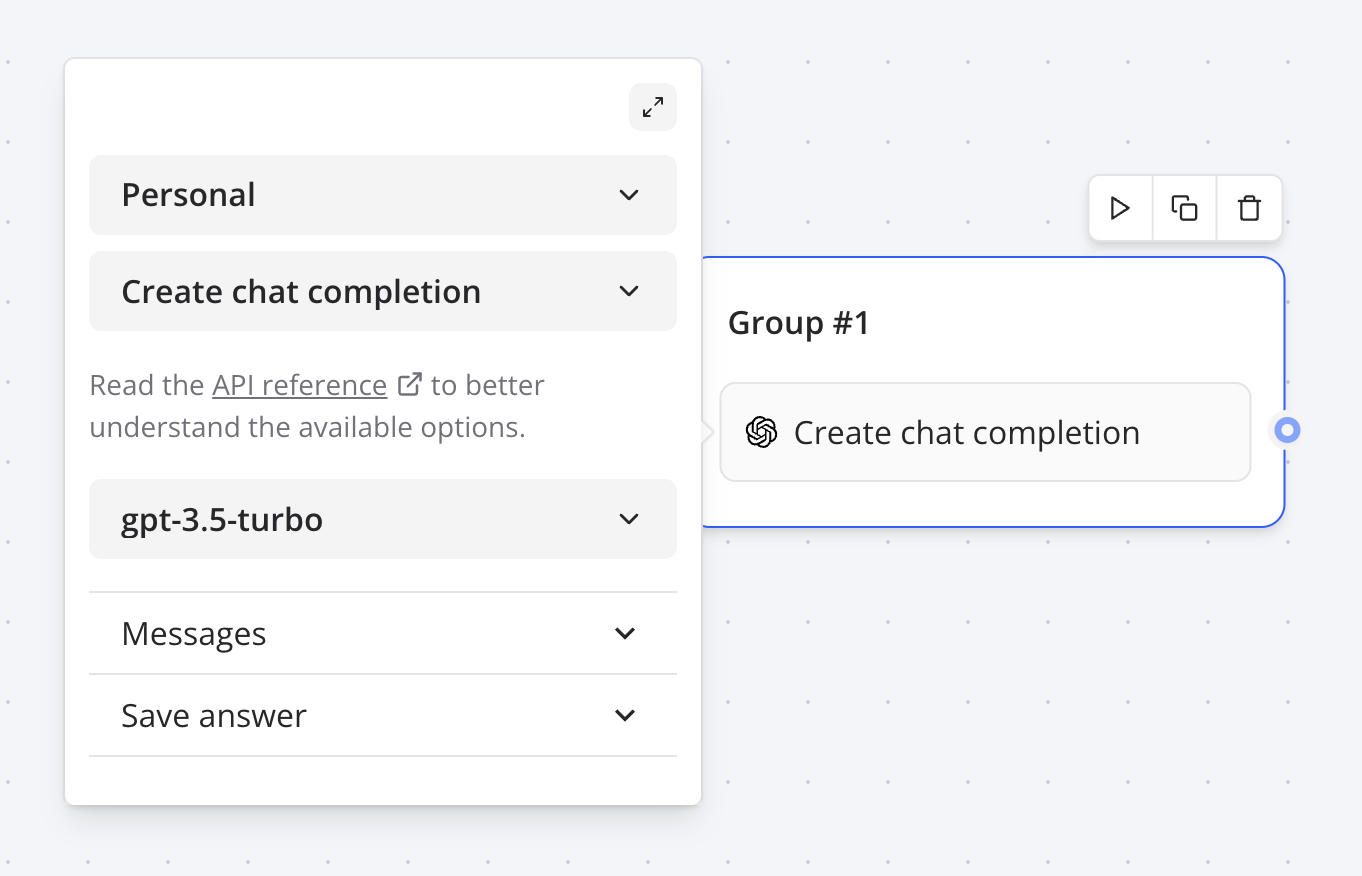
OpenAI block

This integration comes with a convenient message type called Dialogue. It allows you to easily pass a sequence of saved assistant / user messages history to OpenAI:
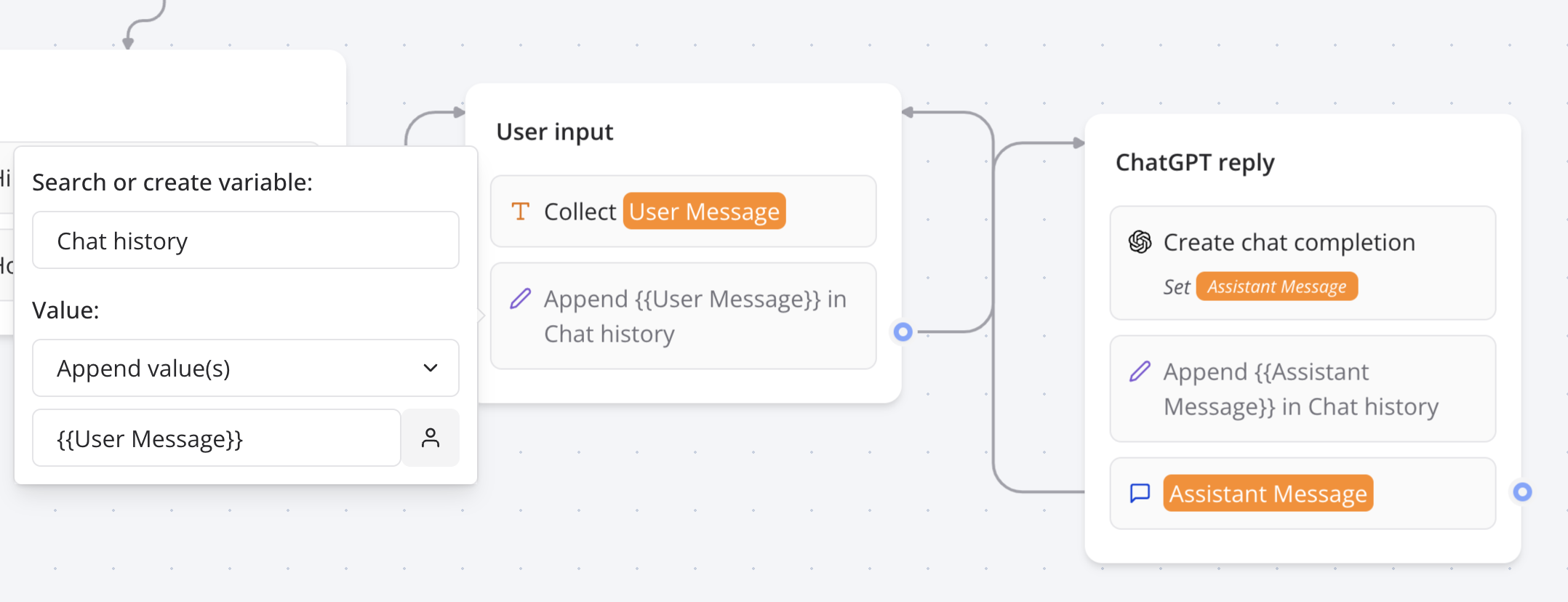
OpenAI messages sequence

Then you can give the OpenAI block access to this sequence of messages:
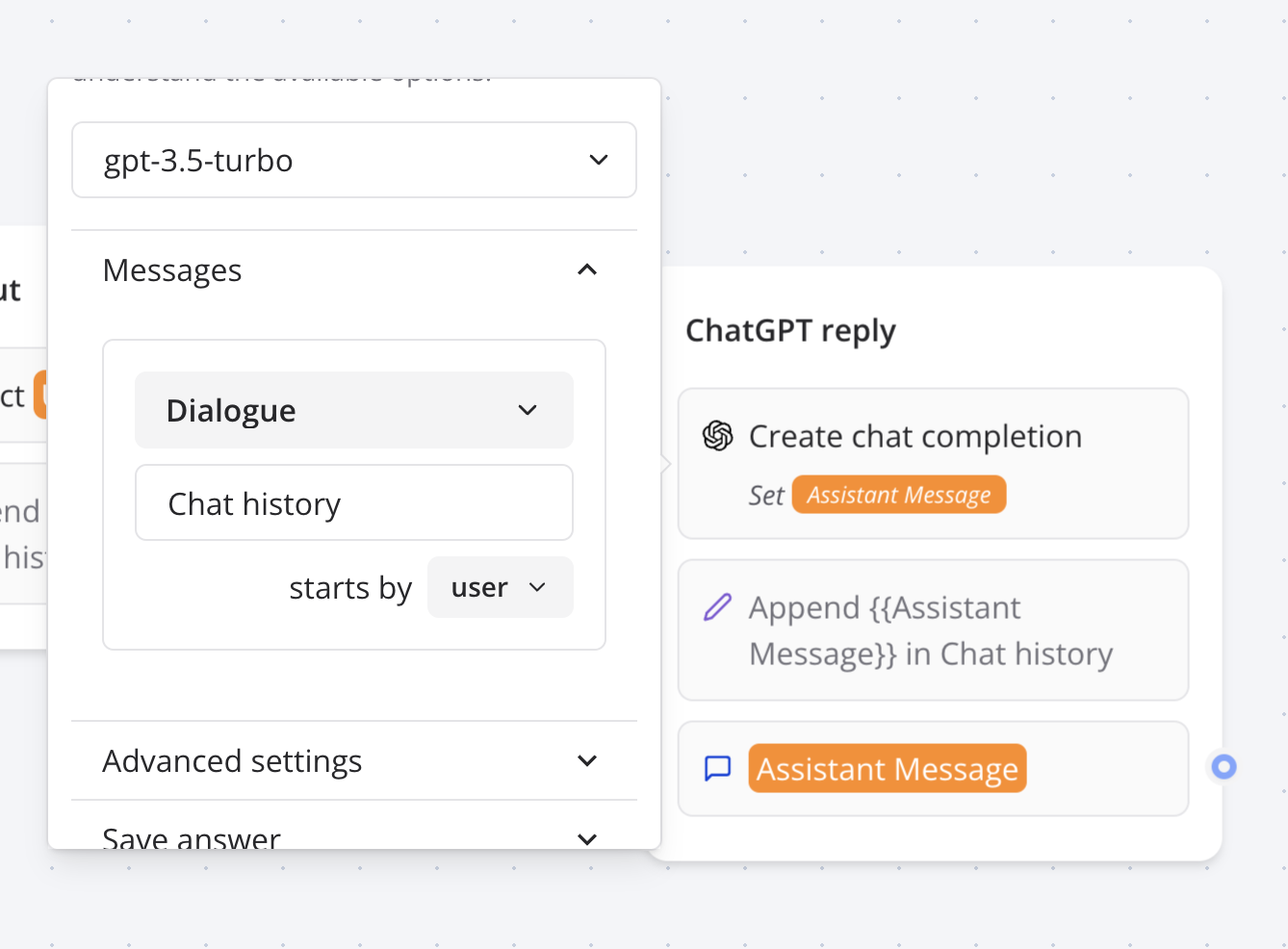
OpenAI messages sequence

Tools

The tools section allows you to add functions that the OpenAI model can execute. Here is an example of a function named getWeather that returns 'Sunny and warm' if you ask about the weather of Paris and 'Rainy and cold' if you ask for any other city.

A more useful example would be, of course, to call an API to get the weather of the city the user is asking about.
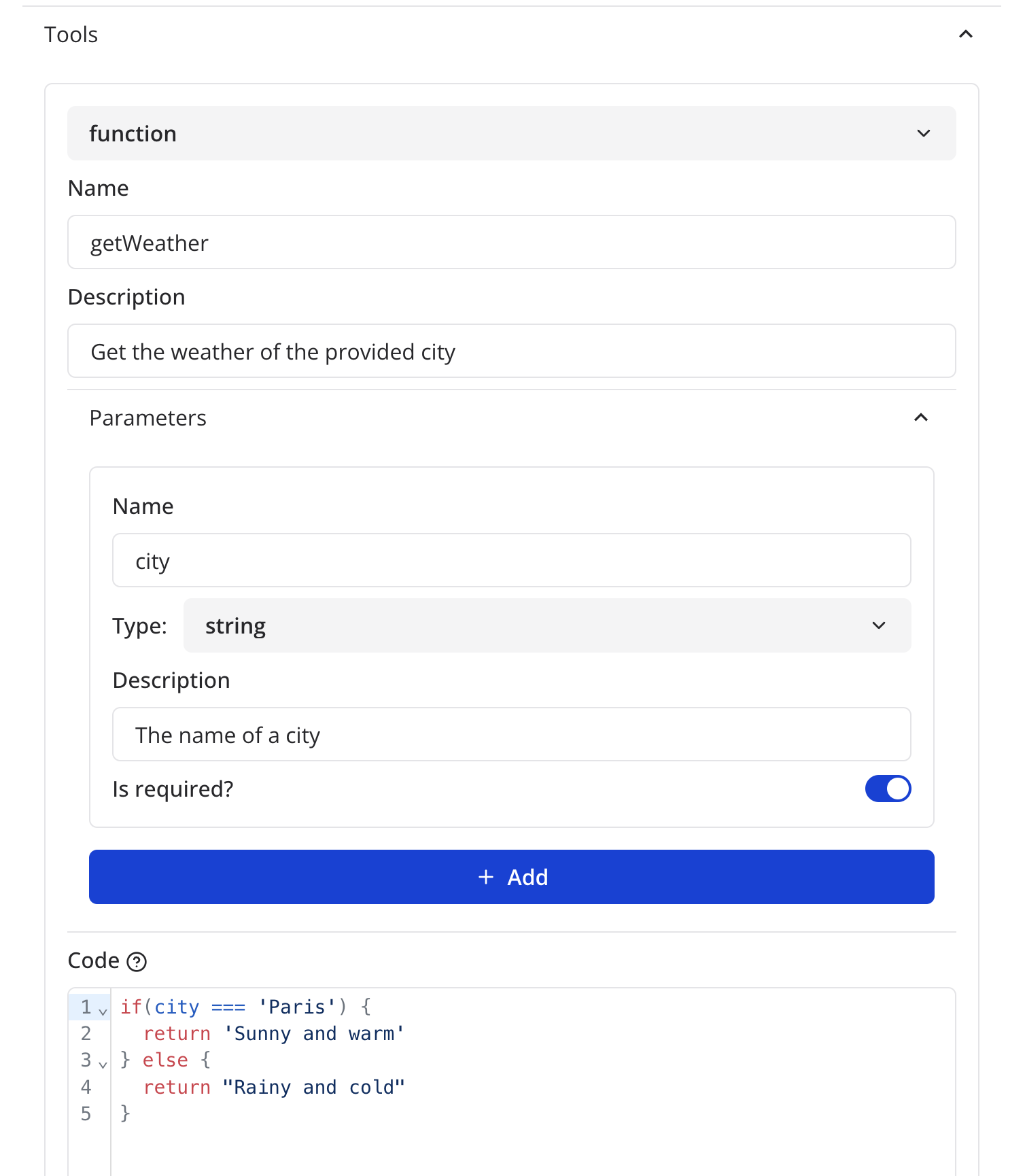
OpenAI tools

As you can see, the code block expects the body of the Javascript function. You should use the return keyword to return value to give back to OpenAI as the result of the function.

If you'd like to set variables directly in this code block, you can use the setVariable function.

Warning: A function is executed on the server so it comes with some limitations listed here.

Ask assistant

This action allows you to talk with your OpenAI assistant. All you have to do is to provide its ID.

In order for your block to remember the conversation history, you need to provide a Thread ID variable. If the variable is empty, it will create a new thread and automatically save the new thread ID in the variable.

Video tutorial available in the Zapbot dashboard

Functions

If you defined functions in your assistant, you can define the function to execute in the Functions section.

Create speech

This action allows you to transform a text input into an audio URL that you can reuse in your bot.

Note: The generated audio URLs are temporary and expire after 7 days. If you need to store them, make sure to download them before they expire.

Video tutorial available in the Zapbot dashboard

Create transcription

This action allows you to transcribe a audio URL into text.

Generate variables

This action allows you to set variables based on a prompt.

Let's you want to want to extract a specific bit of information based on user's last message. You could use this block action to extract for example his name. To do that you could add the following prompt:

Extract user's information from user's last message: "{{Last message}}"

This you could provide for example the following variables: Name, Email

If the Last Message variable is set to "My name is John and my email is [email protected]", then the Name and Email variables will be set to John and [email protected] respectively.

Using Multiple Open AI Blocks: Tips and Tricks

In this video, I discuss some important things to keep in mind when using multiple Open AI blocks consecutively. I provide an example where we ask the user for a topic, generate a summary, and display a list of authors.

I explain that streaming messages is not possible when they are prefixed or suffixed by text, and that all blocks need to compute before displaying anything.

I also demonstrate how formatting can be affected by the presence of text before a message. Watch this video to learn how to optimize your use of multiple Open AI blocks.

Video tutorial available in the Zapbot dashboard

Vision support

Create Chat Message and Ask Assistant blocks support vision. This means that Zapbot automatically detects images URL in any user message provided to OpenAI and parse it. The URL needs to be isolated from the rest of the text message to be properly detected. Here is an example of a message with an image URL:

If the selected model is not compatible with vision, the image URL will be parsed as a plain text message.

What's in this picture?

https://domain.com/image.png

Troubleshooting

Error message: "OpenAI block returned error"

It means your OpenAI block is not configured properly. Please check the following:

  • You have selected an OpenAI account
  • You have at least 1 user message or a Dialogue message set up.

It returns an empty message

It most likely mean that you exceeded your OpenAI free quota. Add a payment method to your OpenAI account to continue using it.

Previous
HTTP Request
Next
Anthropic Claude

On this page

  • Create chat completion
  • Tools
  • Ask assistant
  • Functions
  • Create speech
  • Create transcription
  • Generate variables
  • Using Multiple Open AI Blocks: Tips and Tricks
  • Vision support
  • Troubleshooting
  • Error message: "OpenAI block returned error"
  • It returns an empty message

Stay Updated

Get the latest updates on AI voice technology, product releases, and exclusive resources.

Get Started

Try our products for free
AI Voice Agent
Build voice AI for calls
WhatsApp AI Bot
Automate WhatsApp chats
Website Chatbot
AI chat for websites
Edesy CRM
Manage leads & customers
Book a DemoCall UsEmail Us
Eedesy

Your all-in-one platform for digital innovation. We build AI-powered solutions that transform how businesses operate.

[email protected]+91 95475 31359

Products

  • AI Voice Assistant
  • WhatsApp Voice AI
  • WhatsApp Bot Builder
  • AI Website Chatbot
  • AI-SDR
  • Number Masking
  • Shopify Apps
  • View All Products

Solutions

  • For E-commerce
  • For Healthcare
  • For Real Estate
  • For Restaurants
  • For Appointments
  • View All Use Cases

Services

  • AI Chatbot Development
  • Voice AI Development
  • Shopify Development
  • SaaS Development
  • WhatsApp API Integration
  • View All Services

Resources

  • Documentation
  • Voice Agent Docs
  • API Reference
  • Number Masking API Docs
  • Blog
  • Changelog
  • Book a Demo

Company

  • About Us
  • Contact
  • Careers
  • Privacy Policy
  • Terms of Service

Products

  • AI Voice Assistant
  • WhatsApp Voice AI
  • WhatsApp Bot Builder
  • AI Website Chatbot
  • AI-SDR
  • Number Masking
  • Shopify Apps
  • View All Products

Solutions

  • For E-commerce
  • For Healthcare
  • For Real Estate
  • For Restaurants
  • For Appointments
  • View All Use Cases

Services

  • AI Chatbot Development
  • Voice AI Development
  • Shopify Development
  • SaaS Development
  • WhatsApp API Integration
  • View All Services

Resources

  • Documentation
  • Voice Agent Docs
  • API Reference
  • Number Masking API Docs
  • Blog
  • Changelog
  • Book a Demo

Company

  • About Us
  • Contact
  • Careers
  • Privacy Policy
  • Terms of Service
  • AI Voice Assistant
  • WhatsApp Voice AI
  • WhatsApp Bot Builder
  • AI Website Chatbot
  • AI-SDR
  • Number Masking
  • Shopify Apps
  • View All Products
  • For E-commerce
  • For Healthcare
  • For Real Estate
  • For Restaurants
  • For Appointments
  • View All Use Cases
  • AI Chatbot Development
  • Voice AI Development
  • Shopify Development
  • SaaS Development
  • WhatsApp API Integration
  • View All Services
  • Documentation
  • Voice Agent Docs
  • API Reference
  • Number Masking API Docs
  • Blog
  • Changelog
  • Book a Demo
  • About Us
  • Contact
  • Careers
  • Privacy Policy
  • Terms of Service

Popular Free Tools

Compress PDFMerge PDFPDF to WordGST CalculatorEMI CalculatorSIP CalculatorJSON FormatterBase64 EncoderImage CompressorQR Code GeneratorVoice AI ROI CalculatorAmazon FBA CalculatorAI Email WriterVideo to GIFPrivacy Policy GeneratorCRM ROI CalculatorMeeting Cost Calculator
Categories:PDF ToolsDeveloper ToolsFinance CalculatorsImage ToolsVideo ToolsAI Writing ToolsAudio ToolsWhatsApp ToolsDocument GeneratorsVoice AI ToolsE-commerce ToolsView All Tools

© 2026 Edesy Technology Labs Pvt Ltd

SSL Secured
99.9% Uptime