Eedesy
Book Demo
HomeProductsContact
Zapbot
  • Introduction
  • Overview
  • Graph Editor
  • Variables
  • Publish
  • Share
  • Context Menu
  • Export & Import
  • Overview
  • Text Bubble
  • Image Bubble
  • Video Bubble
  • Audio Bubble
  • Embed Bubble
  • Text Input
  • Number Input
  • Email Input
  • Phone Input
  • Date Input
  • Buttons
  • Picture Choice
  • Rating
  • File Upload
  • Payment
  • Set Variable
  • Condition
  • Redirect
  • Script
  • Zapbot Link
  • Wait
  • Jump
  • A/B Test
  • Webhook
  • Google Sheets
  • HTTP Request
  • OpenAI
  • Anthropic Claude
  • ElevenLabs
  • Google Analytics
  • Meta Pixel
  • Zapier
  • Make.com
  • Chatwoot
  • Zendesk
  • Send Email
  • Overview
  • HTML & JavaScript
  • React
  • Next.js
  • WordPress
  • Webflow
  • iFrame
  • Custom Domain
  • WhatsApp
  • Theme Overview
  • Custom Fonts
  • Bot Settings
  • Remember User
  • Overview
  • Analytics
  • How to Get Help
  • Creating Loops
  • UTM Tracking
  • Multiple Avatars
  • RTL Support
  • FAQ

Related Products

  • AI Voice Agent
  • AI Voice Assistant
  • Try Free
Zapbot
  • Introduction
  • Overview
  • Graph Editor
  • Variables
  • Publish
  • Share
  • Context Menu
  • Export & Import
  • Overview
  • Text Bubble
  • Image Bubble
  • Video Bubble
  • Audio Bubble
  • Embed Bubble
  • Text Input
  • Number Input
  • Email Input
  • Phone Input
  • Date Input
  • Buttons
  • Picture Choice
  • Rating
  • File Upload
  • Payment
  • Set Variable
  • Condition
  • Redirect
  • Script
  • Zapbot Link
  • Wait
  • Jump
  • A/B Test
  • Webhook
  • Google Sheets
  • HTTP Request
  • OpenAI
  • Anthropic Claude
  • ElevenLabs
  • Google Analytics
  • Meta Pixel
  • Zapier
  • Make.com
  • Chatwoot
  • Zendesk
  • Send Email
  • Overview
  • HTML & JavaScript
  • React
  • Next.js
  • WordPress
  • Webflow
  • iFrame
  • Custom Domain
  • WhatsApp
  • Theme Overview
  • Custom Fonts
  • Bot Settings
  • Remember User
  • Overview
  • Analytics
  • How to Get Help
  • Creating Loops
  • UTM Tracking
  • Multiple Avatars
  • RTL Support
  • FAQ
  1. Docs
  2. Zapbot
  3. Logic Blocks
  4. Set Variable

Set variable

Set or modify variable values with custom expressions, JavaScript code, or preset values

The "Set variable" block allows you to set a particular value to a variable.
Set variable

Custom

You can set your variable with any value with Custom. It can be any kind of plain text but also Javascript code.

Expressions with existing variables

It means you can apply operations on existing variables.

Add a value to your variable:

{{Score}} + 5

Compute a sum of variables:

{{Score}} + {{Answer}}

Multiply variables together:

{{Score}} * {{Multiplier}}

Compute a percentage:

{{Score}} * 100 / {{Max Score}}

Extract the first name from a full name:

{{Full name}}.split(' ')[0]

Transform existing variable to upper case or lower case:

{{Name}}.toUpperCase()
{{Name}}.toLowerCase()

This can also be Javascript code. It will read the returned value of the code and set it to your variable.

const name = 'John' + 'Smith'
return name

If you don't provide the return keyword then it will be automatically prepended to the beginning of your code.

'John' + 'Smith'

is the same as

return 'John' + 'Smith'

Note: Variables in script are not parsed, they are evaluated. So it should be treated as if it were real Javascript variables.

So, if you write "{{My variable}}", it will parse the variable ID (something like vclfqgqkdf000008mh3r6xakty). You need to remove the double quotes to properly get the variable content value.

For example,

  • "{{URL base}}/path" => vclfqgqkdf000008mh3r6xakty/path
  • {{URL base}} + '/path' => https://domain.com/path
  • `${{{URL base}}}/path` => https://domain.com/path

Note: Variables content can either be a string or a list of strings. Check out Valid value types for more information.

Empty

Resets your variable as if it was never initialized.

Append value(s)

A convenient value that automatically transform your variable into a list of strings. It will append the value(s) to the list.

3 possible cases here:

  • If the variable is empty, it will create a new array with the provided value(s)
  • If the variable is not an array, it will create a new array with the existing value followed by the provided value(s).
  • If the variable is an array, it will concatenate the provided value(s) to the existing array.

Environment name

This will set your variable with either web or whatsapp depending on the environment.

Device type

This will set your variable with either desktop, tablet or mobile depending on the device type. Under the hood, we use a combination of screen width, user agent and touch capabilities to detect the device type.

Transcript

This preset value will save the entire conversation transcript in a variable. It is super useful to provide context to an AI block or to send it as a recap with the Send email block.

Video tutorial available in the Zapbot dashboard

Result ID

This will set your variable with the current result ID. The result ID is the ID that corresponds to a row of your Results table. It can be considered like a User ID for the currently chatting user.

Yesterday, Now, Tomorrow

This will set your variable with the specified date and time in ISO format. You can optionally provide a time zone to convert the date to the specified time zone.

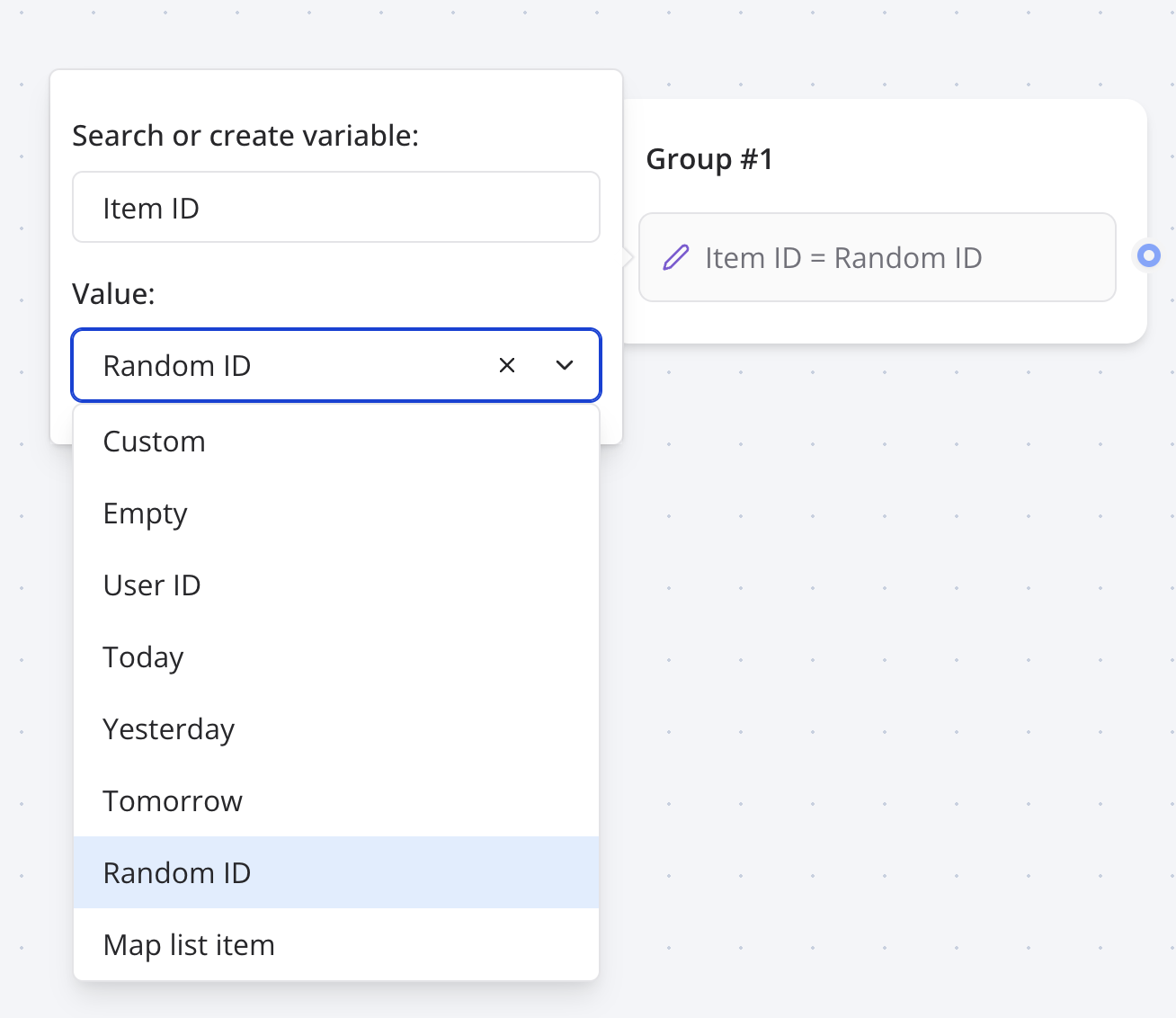
Random ID

This will set your variable with a random ID with the CUID algorithm.

Moment of the day

It will set your variable with either one of these values based on the user's time of the day: morning, afternoon, evening, night.

Then you can use this variable to conditionally display content:
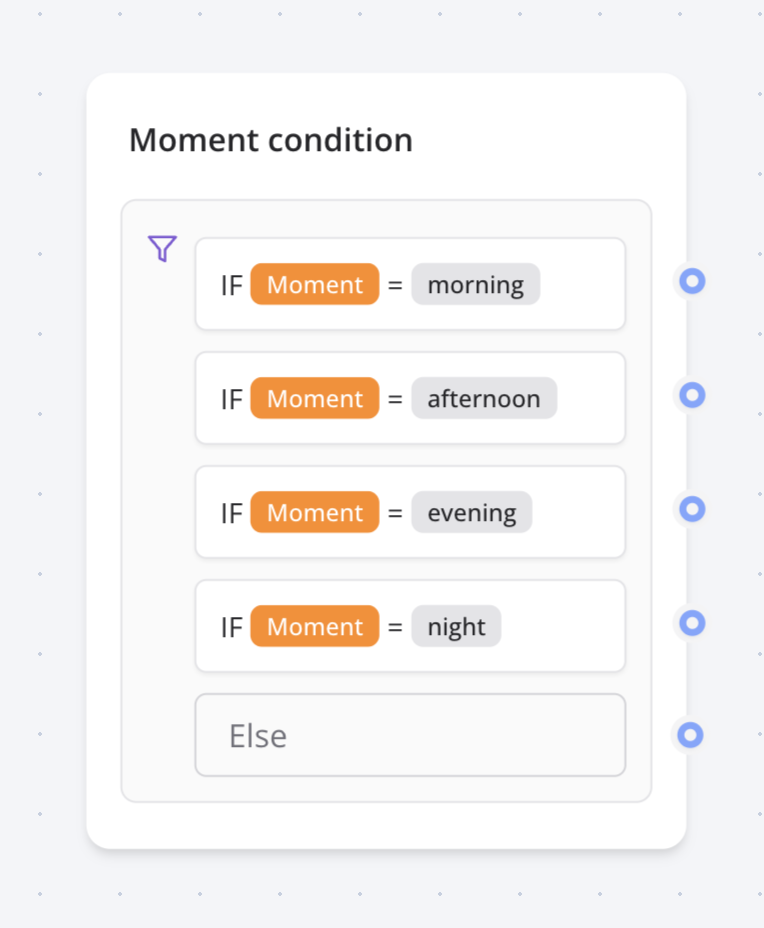
Moment of the day condition

Map item with same index

This is a convenient value block that allows you to easily get an item from a list that has the same index as an item from another list.

When you are pulling data from another service, sometimes, you will have 2 lists: Labels and Ids. Labels are the data displayed to the user and Ids are the data used for other requests to that external service.

This value block allows you to find the Id from Ids with the same index as Label in Labels
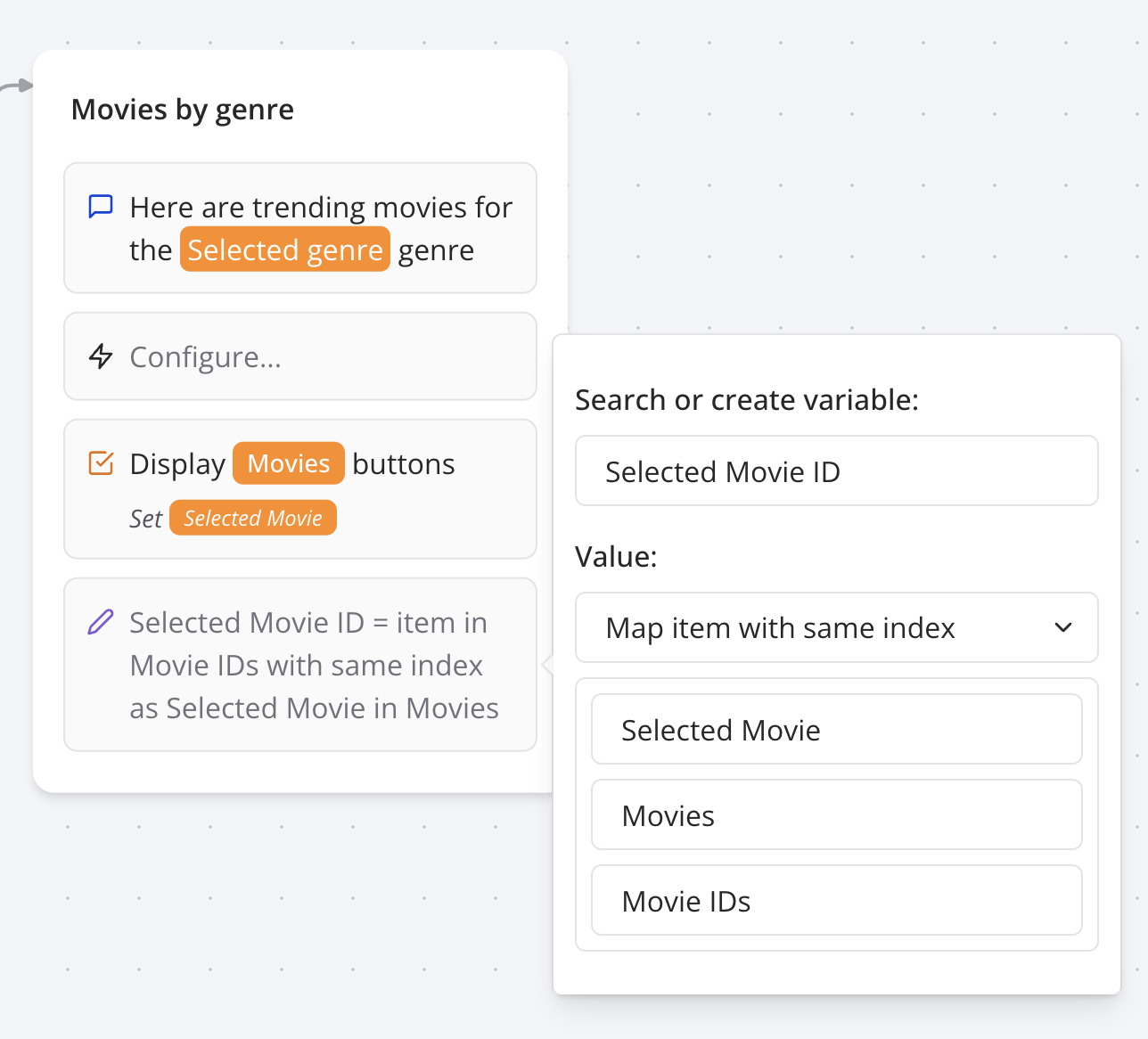
Set variable map item with same index

Phone number

Only available in WhatsApp. This will set your variable with the user's phone number.

Contact name

Only available in WhatsApp. This will set your variable with the user's name.

Pop / Shift

Pop removes the last item from the list variable that you provide and it will set the removed item into the "Popped item" variable. Shift does the same with the first item of the list. These are especially useful when you need to create a loop that processes each item of a list.

Save in results

By default, new variables are not persisted in the Results table. They are only stored for the current user chat session. Enabling this option will save the variable in the Results table.

Execute on client

This option is useful when you want to execute the custom code on the client side. This is only necessary when you need access the user's browser information. So, if you need access to window, document, navigator, etc., you should enable this option.

Get user's geo location

For this you can provide the following custom code:

function getLocation() {
  return new Promise((resolve) => {
    navigator.geolocation.getCurrentPosition(
      (position) =>
        resolve(`${position.coords.latitude}, ${position.coords.longitude}`),
      (error) => resolve('error'),
      { enableHighAccuracy: true, timeout: 5000 }
    )
  })
}

const coords = await getLocation()

// Check for error
if (coords === 'error') {
  return 'Unable to get location'
}

return coords

This custom function can only work when it is executed on the client browser so you need to make sure to enable the "Execute on client" option.

Previous
Payment
Next
Condition

On this page

  • Custom
  • Expressions with existing variables
  • Empty
  • Append value(s)
  • Environment name
  • Device type
  • Transcript
  • Result ID
  • Yesterday, Now, Tomorrow
  • Random ID
  • Moment of the day
  • Map item with same index
  • Phone number
  • Contact name
  • Pop / Shift
  • Save in results
  • Execute on client
  • Get user's geo location

Stay Updated

Get the latest updates on AI voice technology, product releases, and exclusive resources.

Get Started

Try our products for free
AI Voice Agent
Build voice AI for calls
WhatsApp AI Bot
Automate WhatsApp chats
Website Chatbot
AI chat for websites
Edesy CRM
Manage leads & customers
Book a DemoCall UsEmail Us
Eedesy

Your all-in-one platform for digital innovation. We build AI-powered solutions that transform how businesses operate.

[email protected]+91 95475 31359

Products

  • AI Voice Assistant
  • WhatsApp Voice AI
  • WhatsApp Bot Builder
  • AI Website Chatbot
  • AI-SDR
  • Number Masking
  • Shopify Apps
  • View All Products

Solutions

  • For E-commerce
  • For Healthcare
  • For Real Estate
  • For Restaurants
  • For Appointments
  • View All Use Cases

Services

  • AI Chatbot Development
  • Voice AI Development
  • Shopify Development
  • SaaS Development
  • WhatsApp API Integration
  • View All Services

Resources

  • Documentation
  • Voice Agent Docs
  • API Reference
  • Number Masking API Docs
  • Blog
  • Changelog
  • Book a Demo

Company

  • About Us
  • Contact
  • Careers
  • Privacy Policy
  • Terms of Service

Products

  • AI Voice Assistant
  • WhatsApp Voice AI
  • WhatsApp Bot Builder
  • AI Website Chatbot
  • AI-SDR
  • Number Masking
  • Shopify Apps
  • View All Products

Solutions

  • For E-commerce
  • For Healthcare
  • For Real Estate
  • For Restaurants
  • For Appointments
  • View All Use Cases

Services

  • AI Chatbot Development
  • Voice AI Development
  • Shopify Development
  • SaaS Development
  • WhatsApp API Integration
  • View All Services

Resources

  • Documentation
  • Voice Agent Docs
  • API Reference
  • Number Masking API Docs
  • Blog
  • Changelog
  • Book a Demo

Company

  • About Us
  • Contact
  • Careers
  • Privacy Policy
  • Terms of Service
  • AI Voice Assistant
  • WhatsApp Voice AI
  • WhatsApp Bot Builder
  • AI Website Chatbot
  • AI-SDR
  • Number Masking
  • Shopify Apps
  • View All Products
  • For E-commerce
  • For Healthcare
  • For Real Estate
  • For Restaurants
  • For Appointments
  • View All Use Cases
  • AI Chatbot Development
  • Voice AI Development
  • Shopify Development
  • SaaS Development
  • WhatsApp API Integration
  • View All Services
  • Documentation
  • Voice Agent Docs
  • API Reference
  • Number Masking API Docs
  • Blog
  • Changelog
  • Book a Demo
  • About Us
  • Contact
  • Careers
  • Privacy Policy
  • Terms of Service

Popular Free Tools

Compress PDFMerge PDFPDF to WordGST CalculatorEMI CalculatorSIP CalculatorJSON FormatterBase64 EncoderImage CompressorQR Code GeneratorVoice AI ROI CalculatorAmazon FBA CalculatorAI Email WriterVideo to GIFPrivacy Policy GeneratorCRM ROI CalculatorMeeting Cost Calculator
Categories:PDF ToolsDeveloper ToolsFinance CalculatorsImage ToolsVideo ToolsAI Writing ToolsAudio ToolsWhatsApp ToolsDocument GeneratorsVoice AI ToolsE-commerce ToolsView All Tools

© 2026 Edesy Technology Labs Pvt Ltd

SSL Secured
99.9% Uptime